
Bent gusset (140)
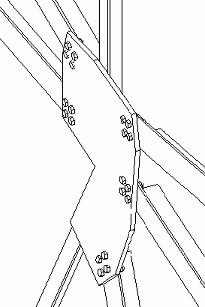
Connects braces in different planes to one or more beams or columns that are in different planes. Creates a gusset plate that is bent along two bending lines. Seals tube or hollow profile braces.
Profiles
Braces: L
Parts created
-
Gusset plate
-
Seal plates
Use for
|
Situation |
Description |
|---|---|
|
|
Do not use for
Beams or columns that are in the same plane.
Before you start
Create one or more beams and columns, and 1 to 10 braces.
Defining properties
Use the following tabs in the dialog box to define the properties of the parts this component creates:
| Tab | Contents | See also |
|---|---|---|
|
Picture |
Dimensions that define gusset plate shape, clearance between braces, cut options for ends of braces. |
|
|
Gusset |
Gusset plate properties, brace notch properties, weld options. Option to cut corner of gusset plate for single brace connections. |
|
|
Brace conn |
Bolt group properties of the bolts connecting the gusset plate to the first beam or column picked. |
|
|
General |
Connection properties, AutoDefaults and AutoConnection rule groups. |
|
|
Bracebolts1 |
Bolt group properties for the bolts that connect the first brace picked to the gusset plate. |
|
|
Bracebolts2 Bracebolts3 |
Bolt group properties for the bolts that connect the second and subsequent braces picked to the gusset plate. |
|
|
Plates |
Options to create filler plates and to bolt braces to both gusset plate and the first or second beam or column picked. |
|
|
Analysis |
Information used in structural analysis. |
Selection order
-
Beam or column in the first plane
-
First brace
-
Second and subsequent braces in the first plane
-
Braces in planes 2 and 3
-
The beam or column in the second plane
-
Click the middle mouse button to create the component