Copy objects using radial array tool

Tekla Structures
Modified: 14 Nov 2024
2024
Tekla Structures

Copy objects using radial array tool

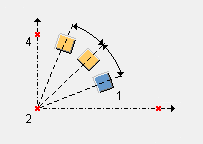
Use Radial array tool to copy selected objects radially along multiple directions at defined intervals or spacing. Tekla Structures does not check for duplicates when you copy objects using this method.
How to use Radial array tool

  1. Click the Applications & components button in the side pane to open the Applications & components catalog.
  2. Search for Radial array tool, and then double-click to open it.
  3. Select the Copy method. The options are:
    • Selected objects only

      This is the default. Only the selected objects are copied.

    • All associated objects

      Selected objects and all objects associated with them are copied. For example, cuts, welds, and bolts.

    • Advanced

      This option is similar to All associated objects, but works better with modifications. For example, when you have stairs that have posts welded to the steps, and you modify the distance between steps.

  4. Select the Rotate copies option.

    The default is Yes.

  5. Define the rotation axis.

    The default is X.

  6. Define the settings.
  7. Select the objects to copy.
  8. Click OK to close the dialog.
  9. Click the middle mouse button.
  10. Pick origin point.
  11. Pick axis direction X.
  12. Pick axis direction Y.

    The selected objects are copied.

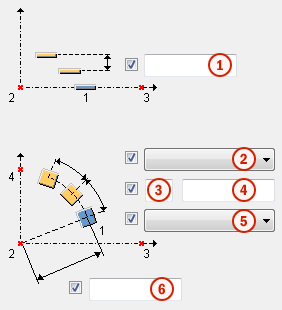
How to define the settings

1

Distance between copies. The default value is 0.

2

Rotation. The options are:

  • Angle (default)

    The copies are rotated by angle.

  • Distance

    The copies are rotated by distance.

3

Number of angles or distances. The default value is 0.

If you leave this empty, the number of copies is taken from the Space between copies field.

4

Space between copies.

Use the space character to separate values. Enter a value for each space between copies.

5

Copy direction. The options are:

  • Normal (default)

    Spacing values are calculated from the origin in positive direction along the axis.

  • Reverse

    Spacing values are calculated from the origin in negative direction along the axis.

  • Centered

    Copies are centered on the origin.

  • Mirror

    Spacing values are calculated from the origin in both positive and negative direction. Mirrored copying doubles the number of copies.

6

Radial distance.

The radial distance should be equivalent to the distance you picked when applying the component.

If the radial distance is smaller or greater than the picked distance, the spacing between the copied objects is not the same as given in the Space between copies box (4).

Tekla Structures calculates the rotation angle according to the dialog values (spacing and radial distance), and the rotation angle overrides the spacing given in the dialog.

Was this helpful?
Submit
Previous
Next