Tekla Structures 2026 SP1

Tekla Structures
Aangepast: 10 apr 2026
2026
Tekla Structures

Tekla Structures 2026 SP1

De nieuwste installatieprogramma's voor servicepacks en bijgewerkte omgevingen van Tekla Structures zijn beschikbaar via Trimble Downloads.

Het wordt aangeraden om de nieuwste versie van de Tekla Structures-servicepack te installeren.

Downloaden Tekla Structures

Automatische conversie van 32-bit Tekla Structures-extensies naar 64-bit

Vanaf Tekla Structures 2026 worden alleen nog 64-bit Tekla Structures-extensiepakketten (.tsep) ondersteund. Als gevolg hiervan zijn extensies die in eerdere versies de vlag voor voorkeur voor 32-bit hadden, niet langer compatibel met Tekla Structures 2026. Om de functionaliteit van deze extensies te behouden, kan Tekla Structures extensies nu automatisch converteren naar 64-bit om ze compatibel te maken met Tekla Structures 2026.

U hebt de optie om de automatische conversie uit te schakelen. Dit doet u door de variabele XS_SKIP_CONVERTING_EXTENSION_APPS_TO_X64 in te stellen op TRUE in het bestand options.ini.

Licenties automatisch vrijgeven bij wisselen van gebruiker

Met de knop Van gebruiker wisselen op het startscherm van Tekla Structures geeft u nu automatisch alle licenties vrij die op de computer van de gebruiker zijn gereserveerd voor de versie van Tekla Structures die op dat moment wordt gebruikt. Licenties die in andere versies van Tekla Structures zijn gereserveerd, worden niet vrijgegeven. Als een licentie in een andere versie gereserveerd wordt gehouden wanneer u van gebruiker wisselt, kan dat tot systeemconflicten leiden.

TTSD-62768

Een probleem met doorzichtigheid opgelost bij weergave van de hartlijn van een onderdeel.

Voorheen werden onderdelen soms transparant wanneer de hartlijn van een onderdeel werd weergegeven en onderdelen werden opgevraagd, gebout of gelast. Dit probleem is opgelost.

TTSD-71363, TTSD-71558

Tekla Model Sharing: Op de achtergrond downloaden van ongelezen pakketten

Ongelezen pakketten van de Tekla Model Sharing-deelservice worden nu automatisch op de achtergrond gedownload en uitgepakt. Dit verkort de inleestijd, omdat een deel van de pakketten al op de lokale schijf is opgeslagen. De automatische download begint zodra een pakket beschikbaar is in de deelservice, op voorwaarde dat het Tekla Structures-model geopend is. De wijzigingen van andere Tekla Model Sharing-gebruikers worden pas toegepast nadat u op Inlezen klikt om het inleesproces te voltooien.

Om het automatisch downloaden van pakketten op de achtergrond uit te schakelen, gaat u naar Bestand > Delen > Instellingen delen en schakelt u de optie Inhoud automatisch downloaden op de achtergrond uit. Wanneer deze optie is uitgeschakeld, blijft achtergrondbewaking actief, maar het downloaden van pakketten wordt niet op de achtergrond gestart.

TTSD-73471, TTSD-75317

Tekla Model Sharing: prestaties verbeterd

Wegschrijven in Tekla Model Sharing is geoptimaliseerd en levert nu betere prestaties. Overbodige verificatiecontroles (controlesommen) voor tekeningbestanden en snapshots zijn nu verwijderd, waardoor wegschrijven sneller verloopt.

TTSD-66883

Probleem met onverwacht afsluiten van Tekla Structures opgelost

Voorheen kon Tekla Structures onverwacht worden afgesloten wanneer het model op een netwerkstation stond en het zijvenster Modelvensters werd geopend. Dit probleem is opgelost.

TTSD-75739

Tekeningtemplates: waardevelden in page headers

In een tekeningtemplate ontbrak een waardeveld wanneer het werd gebruikt in een page header waarin de optie Gebruik kolommen was geselecteerd in de eigenschappen van de page header. Dit probleem is opgelost.

TTSD-75762

De status van de upload van een PDF-tekening naar Trimble Connect in de Documentmanager

De status van de upload van de PDF-tekening naar Trimble Connect wordt nu weergegeven in de Documentmanager in een aparte kolom .

TTSD-74026

Klonen van doorsneden en peilmaten verbeterd

Peilmaten worden nu correct gekloond wanneer doorsneden worden gekloond in overzichttekeningen. De gekloonde doorsneden geven de informatie over de doelverdieping nu correct weer.

TTSD-53534

Tekeningaanzichten die plugins bevatten verplaatsen

Tekeningaanzichten die plugins bevatten van de ene naar de andere tekening verplaatsen werkt nu betrouwbaarder.

Meer informatie over het kopiëren, verplaatsen en koppelen van tekeningaanzichten naar een andere tekening vindt u in Tekeningaanzichten kopiëren, verplaatsen en koppelen.

TTSD-38061

Langere invoer voor eigenschappen van onderdeellabels toegestaan

Het maximum aantal tekens voor namen van eigenschappen in onderdeellabels en andere inhoud is uitgebreid tot 1024 tekens. Dit maakt langere eigenschapsreferenties mogelijk, zoals die gebruikt worden bij de eigenschappenset-integratie in Trimble Connect (bijvoorbeeld: PSET.<bibliotheeknaam>.<eigenschappensetnaam>.<eigenschap>.

Meer informatie over onderdeellabels vindt u in Labeleigenschappen.

TTSD-73274

Nieuw in AI Cloud-productietekeningen (Preview)

De service AI Cloud-productietekeningen werd voor het eerst als previewfunctie beschikbaar gesteld in Tekla Structures 2025 en is sindsdien continu verder ontwikkeld.

Verzamelingen: tekeningen eenvoudiger opnieuw uploaden

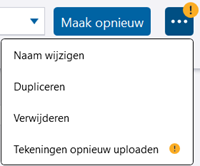
In Tekla Structures 2026 SP1 wordt een systeem geïntroduceerd dat waarschuwt wanneer de verzameling tekeningen bevat waarvoor opnieuw uploaden aanbevolen wordt. Een geel uitroepteken wordt getoond op de knop Verzamelingen in het dialoogvenster Weergave van het gemaakte en op de knop Opties in het dialoogvenster Verzamelingen. Wanneer dit pictogram wordt getoond, betekent dit dat verbeteringen bij het maken van tekeningen beschikbaar zijn in het nieuwste servicepack. Deze verbeteringen kunnen alleen worden toegepast als u de tekeningen opnieuw uploadt. Daarnaast kunt u met de nieuwe tool voor opnieuw uploaden eenvoudig tekeningen opnieuw uploaden, zonder dat u de bijbehorende modellen moet openen.

De knopinfo van de knop Verzamelingen geeft ook aan dat tekeningupdates beschikbaar zijn en het wordt aanbevolen de tekeningen opnieuw te uploaden.

Er zijn twee methoden om de tekening opnieuw te uploaden:

  • Als u alleen tekeningen uit het huidige model opnieuw wilt uploaden, gebruikt u de vertrouwde plusknop en uploadt u de tekeningen vanuit de Documentmanager.
  • Als u tekeningen die opnieuw moeten worden geüpload in één keer wilt uploaden vanuit verschillende modellen, raden we aan dit te doen met het nieuwe, handige dialoogvenster Verzameling bijwerken.

Tekeningen opnieuw uploaden is een aanbeveling. Het maken van tekeningen werkt nog steeds normaal, maar de meest recente verbeteringen en oplossingen in de nieuwste servicepack zijn mogelijk niet geïmplementeerd.

Tekeningen opnieuw uploaden via de Documentmanager

U kunt nu tekeningen opnieuw uploaden naar de actieve verzameling vanuit het huidige model, net zoals u nieuwe tekeningen toevoegt.
  • Selecteer de tekeningen in Documentmanager en klik op de plus-knop in het dialoogvenster Verzamelingen, zoals u dat voorheen deed.

    • Als de selectie alleen nieuwe tekeningen bevat, worden de tekeningen zoals gewoonlijk geüpload.

    • Verouderde tekeningen (ontbrekende onderdelen, verminderde kwaliteit enzovoort) worden genegeerd voor de upload.

    • Als de actieve verzameling al andere versies bevat van sommige tekeningen die u toevoegt, wordt een dialoogvenster geopend waarin wordt gevraagd hoe u de tekeningen wilt toevoegen.

      De tekening die u toevoegt, is mogelijk gemaakt in een oudere Tekla Structures-versie en u hebt de tekening geüpload met een nieuwere Tekla Structures-versie, of de lokale tekening is gewijzigd en opgeslagen en verschilt nu van de versie van de tekening in de cloud.

  • Selecteer wat u wilt doen:
    • Verwijderen en vervangen: Hiermee verwijdert u alle bestaande versies van de tekeningen en vervangt u ze door de nieuwe tekeningen. Tekeningen toevoegen met een nieuwere Tekla Structures-versie is niet compatibel als u een oudere Tekla Structures-versie gebruikt.

    • Nieuwe versies toevoegen: Hiermee voegt u de nieuwe versies van de tekeningen toe. Bestaande versies van de tekeningen worden niet verwijderd.

Tekeningen opnieuw uploaden met het dialoogvenster Verzameling bijwerken

U kunt efficiënt meerdere tekeningen beheren en bijwerken via een intuïtieve interface, waarin de inhoud per model wordt georganiseerd met realtime weergave van de voortgang .

Opmerking: Als u het dialoogvenster Verzameling bijwerken gebruikt om tekeningen opnieuw naar het huidige geopende model te uploaden, raden we u aan het model vooraf op te slaan, zodat de nieuwste tekeningstatus kan worden opgehaald.
  • Om bestaande tekeningen met de nieuwste gegevens opnieuw te uploaden, klikt u op de knop Opties in het dialoogvenster Verzamelingen en selecteert u de nieuwe optie, Tekeningen opnieuw uploaden.
    In het nieuwe dialoogvenster Verzameling bijwerken worden de tekeningen vermeld, georganiseerd op model en met sorteerbare kolomgegevens.

  • Definieer de modellocaties. Als u alleen verouderde tekeningen wilt weergeven, schakelt u het selectievakje Alleen tekeningen tonen die opnieuw moeten worden geüpload bovenaan in. De Tekla Structures-versie die voor het maken van de tekeningen is gebruikt, wordt getoond in de kolom Versie.
  • Selecteer de tekeningen die u wilt uploaden:
    • Als u alleen de geselecteerde tekeningen wilt uploaden, schakelt u de selectievakjes naast de gewenste tekeningen in.

    • Als u alle verouderde tekeningen in een model wilt uploaden, schakelt u het selectievakje naast het model in.

    • Als u alle verouderde tekeningen wilt uploaden, schakelt u het selectievakje Opnieuw uploaden in de titelregel in.

  • Klik op Bijwerken en selecteer een van de volgende opties:

    • Bestaande verzameling bijwerken: De verouderde tekeningen in de verzameling worden bijgewerkt met nieuwe versies. Met deze optie wordt de nieuwste tekeningversie geüpload en worden alle andere versies van die tekening verwijderd. Dit is de beste optie als u uw bestaande verzamelingsstructuur wilt behouden.
    • Bestaande verzameling dupliceren: De actieve verzameling wordt gedupliceerd en de tekeningen worden daarnaartoe geüpload. Selecteer deze optie als u de originele versies apart wilt bewaren.
  • Als u het model geopend hebt waarin de tekeningen staan die u opnieuw wilt uploaden, wordt u gevraagd het model op te slaan om de laatste wijzigingen toe te passen en door te gaan met de upload. Klik op Opslaan.
  • Als u een model dat is gemaakt in een oudere Tekla Structures-versie opslaat, kunt u het model daarna niet meer openen in een oudere Tekla Structures-versie. U wordt gevraagd of u wilt doorgaan met opslaan. Klik op Ja om door te gaan.
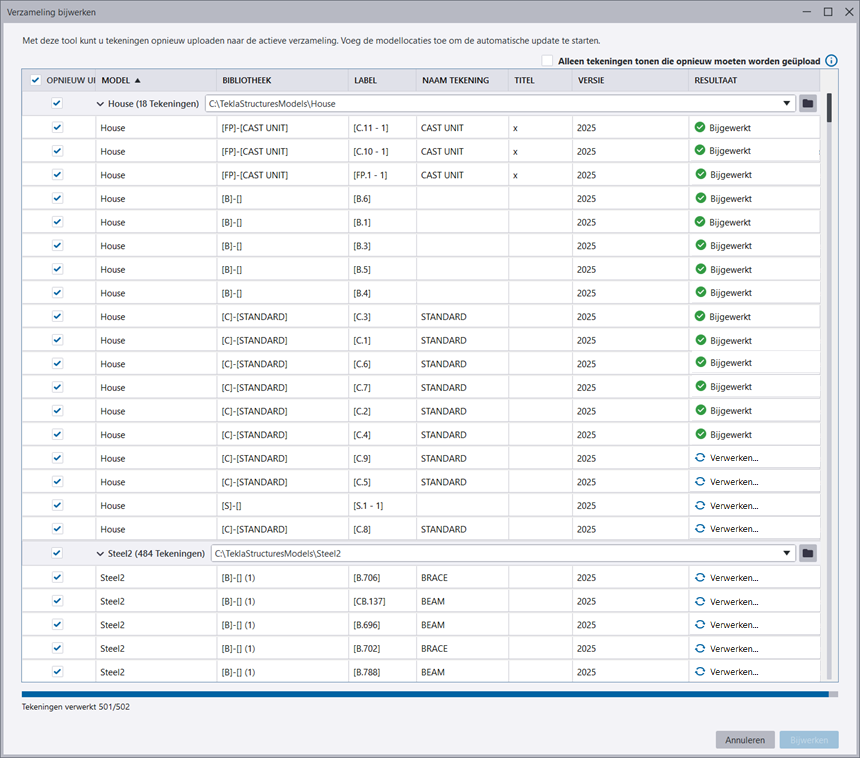
Het uploaden start en het bericht Verwerken wordt weergegeven naast de tekeningen die worden geüpload. U kunt het uploadproces onderin het dialoogvenster volgen.

U kunt alle lopende taken annuleren door te klikken op Annuleren. Hiermee worden niet de wijzigingen ongedaan gemaakt die al in de huidige verzameling zijn aangebracht. Het bericht Proces geannuleerd wordt getoond voor alle rijen die worden verwerkt.

Nadat de tekeningen zijn geüpload, wijzigt het bericht naar Bijgewerkt en de knop Annuleren wijzigt in Sluiten.

Een foutmelding wordt bijvoorbeeld getoond in de volgende situaties:

  • Een tekening ontbreekt of is niet beschikbaar.
  • Een modelpad is onjuist of ontbreekt.
  • De tekening is verouderd of er is een extractiefout opgetreden.
  • Er zijn enkele technische fouten opgetreden.

Meer informatie over opnieuw uploaden vindt u in de paragraaf Verzamelingen van productietekeningen en bibliotheken beheren. Zie Productietekeningen maken met AI en verzamelingen in de cloud (Preview) voor meer informatie over AI Cloud-productietekeningen.

TTSD-75742

Andere verbeteringen in AI Cloud-productietekeningen

Sommige teksten in de gebruikersinterface waren in het Engels, zelfs nadat de taal was gewijzigd. Dit probleem is opgelost.

TTSD-75068

Oplossingen in Tekla PowerFab Connector

  • In de Indieningshistorie voor Tekla PowerFab-export wordt in Uitgegeven door nu de juiste naam van de verstrekker weergegeven. Voorheen werd de naam van de huidige gebruiker weergegeven, zelfs als deze niet de verstrekker was.

    TTSD-74431

  • Wanneer u voorheen een fabricagepakket exporteerde met Tekeningen voor externe goedkeuring en een tekeningtype geselecteerd, werden extra merken en onderdelen geëxporteerd. Dit probleem is opgelost.

    TTSD-74449

Oplossingen

Apply
Nummer defect Ontwikkelingsgebied Beschrijving
TSAC-9900 Concrete components

Embedded anchors (008): Previously, in some situations, the Selected part option for anchor placement did not work properly. This issue has now been fixed.

TSAC-9901 Concrete components

Embedded anchors (008): Previously, in some situations, the component stopped working correctly when deployed on staircases. This issue has now been fixed.

TSAC-9969 Concrete components

Wall layout: Binding to grid level now works correctly in situations when only the top level offset is used. Also, the position of grid level binding is now correct when the wall layout coordinate system is not on the global coordinate system.

TSAC-7139 Steel components

Truss (S78): Previously, the first vertical beam was not affected by the rotation option specified for vertical beams. This issue has now been fixed.
 

TSAC-9371 Steel components

Railings (S77): Previously, when continuous profiles were used together with vertical middle rails, incorrect assemblies were created. This issue has now been fixed.

TSAC-9762 Steel components

Railings (S77): Previously, the rails were sometimes welded to incorrect stanchions. This issue has now been fixed.

TSAC-9812 Steel components

Bolted gusset (11): Previously, using the Split command on one of the secondary parts also affected the shape of the gusset. This issue has now been fixed.

TSAC-9866 Steel components

Tube gusset (20): Previously, the cut through the main part was not created correctly in some situations. This issue has now been fixed.

TSAC-9876 Steel components

Cold rolled overlap (1): Previously, stay plates were not created when the bottom flange plate was cut using a PEB end plate to the flange connection. This issue has now been fixed.

TSAC-9877 Steel components

Two sided end plate (142): Previously, haunch plates were not created correctly when you defined some specific haunch plate dimensions. This issue has now been fixed.

TSAC-9922 Steel components

Z Pan (S74): Previously, the top landing length was not applied correctly in some situations. This issue has now been fixed.

TSAC-9924 Steel components

Central bracing simple (51): Previously, incorrect flange cuts were created. This issue has now been fixed.

TSAC-9926 Steel components

Offshore (9): Previously, some notches were created incorrectly when the main part profile type was U. This issue has now been fixed.

TSAC-9928 Steel components

Stairs (S71): Previously, when using custom steps, the bolts connecting them to stringers were sometimes created incorrectly. This issue has now been fixed.
 

TSAC-9952 Steel components

Stiffened end plate (27): Previously, weld 9 was created in an incorrect location in some situations. This issue has now been fixed.

TSAC-9767 Import, export, interoperability

Layout manager: You can now use CUSTOM.LAYOUTPOINT_DELTA_X, CUSTOM.LAYOUTPOINT_DELTA_Y , CUSTOM.LAYOUTPOINT_DELTA_V, and CUSTOM.LAYOUTPOINT_DELTA_H attributes to report out-of-tolerance deviation values that Layout manager calculates between measured points and design points.

TSAC-9849 Import, export, interoperability

Layout manager: Design point symbols are now updated correctly when the tolerance settings are changed in the Layout manager Settings dialog.

TTSD-68390 Import, export, interoperability

IFC property sets: When creating property sets for the IFC export, you can now select and add also custom properties. Previously, only default attributes were available for selection.

TTSD-74160 Import, export, interoperability

IFC property sets: IFC property set names are no longer limited to being unique. Now multiple property sets can be created with the same name.

TTSD-74447 Import, export, interoperability

IFC4 export: Previously, some properties (Revision property, DRAWING.REVISION, DRAWING .ASSEMBLY, and DRAWING.CAST_UNIT) were not exported in the IFC4 export. This issue has been fixed.

TTSD-74795 Import, export, interoperability

Publish to Tekla Structural Designer: Updating the cloud model name has been enhanced in the Publish to Tekla Structural Designer dialog. The information in the Model description, Revision, and Revision description boxes is now preserved if the model name is edited manually.

TTSD-75003 Import, export, interoperability

IFC4 export: Previously, custom properties derived from assembly hierarchy were not exported through the IFC4 export. This issue has been fixed.

TTSD-75066 Import, export, interoperability

IFC4.3 export: Now, the IFC4.3 export also supports IfcBearing when the Reference view or Design transfer view export type is used.

TTSD-75732 Import, export, interoperability

IFC4 export: Sometimes, the export of custom properties did not work. This issue has been fixed.

TPLED-427 Templates and reports

Template Editor: When the first row of a table (row with Use Columns selected) could not fit into the page, the page height became incorrect, which disrupted the page layout. This issue has been fixed.

TSAC-9758 Drawings

View-specific dimensioning of bolts: The bolt side recognition now works correctly, and the bolting order no longer affects the dimensioning of only the selected sides.

TSAC-9777 Drawings

View-specific dimensioning: Now the Dimension to option 'center' also works for reinforcement.  The center point for dimensions of single rebars and rebar sets is taken from the polygon center. 

Image
Dimension to center
TSAC-9920 Drawings

View-specific dimensioning: Bolt groups are no longer dimensioned multiple times.

TTSD-70329 Drawings

Rebar marks: Rebar marks created with the Perpendicular leader lines option now align perpendicularly to the bars even when the bars are oriented diagonally. Previously, the rebar marks did not always follow the orientation of the bars.

TTSD-70408 Drawings

The performance of modifying the size of the drawing view frame has been improved. Additionally, a specific performance improvement has been made for modifying drawing views that contain multiple instances of the Object dimensioning tool plugin.

TTSD-70483 Drawings

Symbols are now positioned correctly in drawing templates. Previously, symbols were occasionally drawn slightly off from the correct location due to inaccuracies in the placement calculation.

TTSD-72237 Drawings

Sometimes, the property pane did not show the properties of the selected object when you edited a model and a general arrangement drawing side by side and switched between the modes. This issue has been fixed.

TTSD-73068 Drawings

Rebar dimension marks: When modifying an existing rebar dimension mark, the Include rebar mark setting and the related properties are now disabled if a rebar mark already exists.

TTSD-73475 Drawings

Previously, Trimble Connect related settings were visible in the Print drawings dialog when printing to a printer or a plot file. This issue has been fixed, and those settings are only visible when printing to a PDF file.

TTSD-73709 Drawings

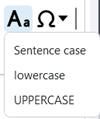
Change text case: You can use the new Change case toolbar control to change the case for the selected Text object or Text file object rich text content in the built-in Text editor and in the property pane editor. The options are Sentence caselowercase, and UPPERCASE. For plain text, the control is only available in the built-in Text editor.

Image
Change text case
TTSD-74026 Drawings

Drawing 2D library: The 2D library now supports insulation drawing objects.

TTSD-74494 Drawings

The Pattern line tool is now faster. 

TTSD-74864 Drawings

Create fabrication drawings (local): Creating fabrication drawings for cast units did not always work when you had selected the cast units using the Select parts selection switch and disabled the Creation review dialog. This issue has been fixed.

TTSD-74939 Drawings

Weld marks: The background settings for weld marks are now correctly applied during drawing creation.

TTSD-75259 Drawings

Earlier, in specific cases, changing the properties of rebar dimension marks for rebars in sloped parts could cause changes in dimensions to part edge. This issue has been fixed.

TTSD-75348, TTSD-71783 Drawings

Cloning: Previously, when you cloned general arrangement drawings containing section views, the section views disappeared from the source drawing. This issue has now been fixed. Additionally, the cloning of section views in general arrangement drawings has been improved so that the content of the cloned section views now corresponds to the content of the selected model view.

TTSD-75365 Drawings

Reinforcement ticks and tags: The status bar now shows the translated status bar messages. Previously, the status bar showed the untranslated placeholder texts.

TTSD-75735 Drawings

If a precast part and a cast-in-place part were touching each other in the model, one of them disappeared from the drawing. This issue has been fixed.

TTSD-75753 Drawings

Colors in drawings: RGB colors did not work for graphical objects in templates, such as lines, circles, and rectangles. This issue has been fixed.

TTSD-75763 Drawings

Insulation: Earlier, when you had selected one of the insulation handles and modified the insulation alignment properties, the insulation handle remained selected incorrectly. This issue has been fixed.

TTSD-75925 Drawings

Earlier, when working with the model and a general arrangement drawing simultaneously, placing a level mark in the drawing changed the current work plane in Tekla Structures. This issue has been fixed.

TTSD-74010 Tekla Model Sharing

Tekla Model Sharing: Previously, when you excluded a model from the sharing service via the File menu, the confirmation message was not displayed. This issue has been fixed.

TTSD-74235 Tekla Model Sharing

Previously, the shared model environment was sometimes incorrectly displayed as Custom instead of a local environment. This issue has been fixed.

TTSD-74964 Tekla Model Sharing

With on-premises sharing services, the previously added on-premises servers were not visible in the list of services. This issue has been fixed, and the previously added servers are visible in the list.

TTSD-74777 Reinforcement

Previously, in selection filters, Start number was duplicated in the Reinforcing bar category. This issue has been fixed.

TTSD-64263 Modeling

An issue was fixed where diagnosing and repairing previously deleted user-defined attribute values instead of converting them to the correct value type. Tekla Structures now first attempts to convert UDAs to the correct value type, and only then deletes any possible mismatched values.

TTSD-69478 Modeling

Previously, text in Japanese and some other languages was not displayed correctly in the modeling view. This issue has been fixed.

TTSD-70627 Modeling

Previously, when the work plane was set to a location other than the default plane and bolts were created using a part face, the bolts were positioned far from the selected part face. This issue has been fixed.

TTSD-72220 Modeling

Previously, when a polybeam with a profile containing at least one very large dimension was created, and a new part view was created, for example, from the face of another object, the unwanted polybeam appeared in the new view. This has been fixed, and the view depth does not display these objects any more.

TTSD-73317 Modeling

Previously, when modifying the dimension value of a contour plate by entering the value, the opposite side might also be modified, even when the adjacent and modified sides were not orthogonal. This issue has been fixed.

TTSD-74167 Modeling

Tekla Structures model is now displayed correctly even when the view has a very narrow aspect ratio.

TTSD-74410 Modeling

Trimble Connect: When XS_FIRM and XS_PROJECT are set to a Trimble Connect folder path, local sync files will no longer be deleted if there is an API failure or outage. However, if the folder does not exist in Trimble Connect, the files will be deleted.

TTSD-74639 Modeling

Building hierarchy: Previously, when filtering the location breakdown structure, using the Building property did not work if the objects were under a building section. This issue has been fixed.

TTSD-74738 Modeling

The number of unnecessary log entries generated by the property pane has been reduced.

TTSD-74749 Modeling

Previously, Tekla Structures sometimes closed unexpectedly if a connection inserted a weld that had invalid profile information. This issue has been fixed.

TTSD-74775 Modeling

In the property pane, when filtering properties using the search, the entries in the additional matches group did not always enable the Modify button. This issue has been fixed.

TTSD-74842 Modeling

Building hierarchy: When using the Select assigned objects command, the objects assigned to a building hierarchy element are now shown as selected objects in the property pane.

TTSD-74845 Modeling

Previously, the geometry data returned by Reinforcement.GetRebarComplexGeometries was in the current work plane for rebar groups and single bars, but in global coordinates for rebar sets. This inconsistency has now been fixed, and the geometry data for rebar sets is now returned in the current work plane.

TTSD-74847 Modeling

Live Collaboration: When sharing clip planes and clip boxes in Live Collaboration sessions, the base point is now taken into consideration.

TTSD-74959 Modeling

Previously, clipped objects appeared in the model view when the color theme was changed. This issue has been fixed.
 

TTSD-74982 Modeling

Previously, grids with mid gray grid lines on a black background had low visibility. This issue has been fixed.

TTSD-75292 Modeling

When items were used to model cast-in-place structures, item solids were not clipped correctly if the items were not detailed, for example, by cuts. This resulted in incorrect geometry representation in model views and drawings, such as showing edges between adjacent item faces in continuous structures, and incorrect volumes if parts of the items were overlapping. This issue has been fixed.

TTSD-75359 Modeling

An issue with listing folder contents in Trimble Connector for certain projects has been fixed.

TTSD-75382 Modeling

Copying custom object UDA values in the property pane works now more reliably.

TTSD-75431 Modeling

Autosaving: Sometimes, the username used as a suffix for drawing autosave metadata was different than for other autosaved files. This caused the dialog prompting to open either autosaved or manually saved model to be empty. This issue has been fixed.

TTSD-75487 Modeling

Live Collaboration: When sharing markups in Live Collaboration sessions, the base point is now taken into consideration.

TTSD-75713 Modeling

Previously, UDA values for certain custom objects, such as timber columns, could no longer be changed in the property pane. This issue has been fixed.

TTSD-75766 Modeling

Autosaving: Previously, when an autosaved model was available, an empty autosave dialog was shown when using Spanish as the Tekla Structures language. This issue has been fixed.

TTSD-75997 Modeling


Previously, moving grid plane handles was not possible when direct modification was switched off. This issue has been fixed.

TTSD-74325 Licensing

An informative error message is now shown when a user opens a model while signed in to Tekla Launcher and Tekla Structures with different Trimble Identities.

TTSD-75477, TTSD-75770 Core

Trimble Visualizer has been updated to a newer version.

TTSD-75521 Core

Previously, when you selected Close window on the Tekla Structures icon in the Windows taskbar, Tekla Structures could stop working unexpectedly instead of shutting down. This issue has been fixed, and Tekla Structures stability has been improved.

TTSD-75074 Tools and components

Tekla Warehouse: Security has been improved through minor updates.

TSAC-9971 Numbering

An issue was fixed with the Design group numbering dialog not opening.

TTSD-74259 Numbering

Previously, the message "Numbering rebar sequences..." remained visible on the status bar after numbering was done. Now the message is removed when the Numbering preview dialog is opened.

TSAC-8632, TSAC-8577 Import, export, interoperability (steel)

DSTV to DXF converter: Slotted holes are now created in the DXF files also on the back of the plates.

TSAC-8394 Import, export, interoperability (concrete)

BVBS export: A mesh created from a rebar assembly now has its position set to the rebar assembly position instead of an arbitrary number.

TSAC-8396 Import, export, interoperability (concrete)

BVBS export: The Rebar assembly type selected in the Rebar assembly properties will now be used as the rebar assembly type parameter in the header block of the exported BVBS file.

TSAC-9941 Import, export, interoperability (concrete)

Export Unitechnik (79): Previously, incorrect data was exported for reinforcement that was exported as embed. This issue has been fixed.

Was dit nuttig?
Indienen
Vorige
Volgende