| TSAC-9900 |
Concrete components |
Embedded anchors (008): Previously, in some situations, the Selected part option for anchor placement did not work properly. This issue has now been fixed. |
| TSAC-9901 |
Concrete components |
Embedded anchors (008): Previously, in some situations, the component stopped working correctly when deployed on staircases. This issue has now been fixed. |
| TSAC-9969 |
Concrete components |
Wall layout: Binding to grid level now works correctly in situations when only the top level offset is used. Also, the position of grid level binding is now correct when the wall layout coordinate system is not on the global coordinate system. |
| TSAC-7139 |
Steel components |
Truss (S78): Previously, the first vertical beam was not affected by the rotation option specified for vertical beams. This issue has now been fixed.
|
| TSAC-9371 |
Steel components |
Railings (S77): Previously, when continuous profiles were used together with vertical middle rails, incorrect assemblies were created. This issue has now been fixed. |
| TSAC-9762 |
Steel components |
Railings (S77): Previously, the rails were sometimes welded to incorrect stanchions. This issue has now been fixed. |
| TSAC-9812 |
Steel components |
Bolted gusset (11): Previously, using the Split command on one of the secondary parts also affected the shape of the gusset. This issue has now been fixed. |
| TSAC-9866 |
Steel components |
Tube gusset (20): Previously, the cut through the main part was not created correctly in some situations. This issue has now been fixed. |
| TSAC-9876 |
Steel components |
Cold rolled overlap (1): Previously, stay plates were not created when the bottom flange plate was cut using a PEB end plate to the flange connection. This issue has now been fixed. |
| TSAC-9877 |
Steel components |
Two sided end plate (142): Previously, haunch plates were not created correctly when you defined some specific haunch plate dimensions. This issue has now been fixed. |
| TSAC-9922 |
Steel components |
Z Pan (S74): Previously, the top landing length was not applied correctly in some situations. This issue has now been fixed. |
| TSAC-9924 |
Steel components |
Central bracing simple (51): Previously, incorrect flange cuts were created. This issue has now been fixed. |
| TSAC-9926 |
Steel components |
Offshore (9): Previously, some notches were created incorrectly when the main part profile type was U. This issue has now been fixed. |
| TSAC-9928 |
Steel components |
Stairs (S71): Previously, when using custom steps, the bolts connecting them to stringers were sometimes created incorrectly. This issue has now been fixed.
|
| TSAC-9952 |
Steel components |
Stiffened end plate (27): Previously, weld 9 was created in an incorrect location in some situations. This issue has now been fixed. |
| TSAC-9767 |
Import, export, interoperability |
Layout manager: You can now use CUSTOM.LAYOUTPOINT_DELTA_X, CUSTOM.LAYOUTPOINT_DELTA_Y , CUSTOM.LAYOUTPOINT_DELTA_V, and CUSTOM.LAYOUTPOINT_DELTA_H attributes to report out-of-tolerance deviation values that Layout manager calculates between measured points and design points. |
| TSAC-9849 |
Import, export, interoperability |
Layout manager: Design point symbols are now updated correctly when the tolerance settings are changed in the Layout manager Settings dialog. |
| TTSD-68390 |
Import, export, interoperability |
IFC property sets: When creating property sets for the IFC export, you can now select and add also custom properties. Previously, only default attributes were available for selection. |
| TTSD-74160 |
Import, export, interoperability |
IFC property sets: IFC property set names are no longer limited to being unique. Now multiple property sets can be created with the same name. |
| TTSD-74447 |
Import, export, interoperability |
IFC4 export: Previously, some properties (Revision property, DRAWING.REVISION, DRAWING .ASSEMBLY, and DRAWING.CAST_UNIT) were not exported in the IFC4 export. This issue has been fixed. |
| TTSD-74795 |
Import, export, interoperability |
Publish to Tekla Structural Designer: Updating the cloud model name has been enhanced in the Publish to Tekla Structural Designer dialog. The information in the Model description, Revision, and Revision description boxes is now preserved if the model name is edited manually. |
| TTSD-75003 |
Import, export, interoperability |
IFC4 export: Previously, custom properties derived from assembly hierarchy were not exported through the IFC4 export. This issue has been fixed. |
| TTSD-75066 |
Import, export, interoperability |
IFC4.3 export: Now, the IFC4.3 export also supports IfcBearing when the Reference view or Design transfer view export type is used. |
| TTSD-75732 |
Import, export, interoperability |
IFC4 export: Sometimes, the export of custom properties did not work. This issue has been fixed. |
| TPLED-427 |
Templates and reports |
Template Editor: When the first row of a table (row with Use Columns selected) could not fit into the page, the page height became incorrect, which disrupted the page layout. This issue has been fixed. |
| TSAC-9758 |
Drawings |
View-specific dimensioning of bolts: The bolt side recognition now works correctly, and the bolting order no longer affects the dimensioning of only the selected sides. |
| TSAC-9777 |
Drawings |
View-specific dimensioning: Now the Dimension to option 'center' also works for reinforcement. The center point for dimensions of single rebars and rebar sets is taken from the polygon center.
|
| TSAC-9920 |
Drawings |
View-specific dimensioning: Bolt groups are no longer dimensioned multiple times. |
| TTSD-70329 |
Drawings |
Rebar marks: Rebar marks created with the Perpendicular leader lines option now align perpendicularly to the bars even when the bars are oriented diagonally. Previously, the rebar marks did not always follow the orientation of the bars. |
| TTSD-70408 |
Drawings |
The performance of modifying the size of the drawing view frame has been improved. Additionally, a specific performance improvement has been made for modifying drawing views that contain multiple instances of the Object dimensioning tool plugin. |
| TTSD-70483 |
Drawings |
Symbols are now positioned correctly in drawing templates. Previously, symbols were occasionally drawn slightly off from the correct location due to inaccuracies in the placement calculation. |
| TTSD-72237 |
Drawings |
Sometimes, the property pane did not show the properties of the selected object when you edited a model and a general arrangement drawing side by side and switched between the modes. This issue has been fixed. |
| TTSD-73068 |
Drawings |
Rebar dimension marks: When modifying an existing rebar dimension mark, the Include rebar mark setting and the related properties are now disabled if a rebar mark already exists. |
| TTSD-73475 |
Drawings |
Previously, Trimble Connect related settings were visible in the Print drawings dialog when printing to a printer or a plot file. This issue has been fixed, and those settings are only visible when printing to a PDF file. |
| TTSD-73709 |
Drawings |
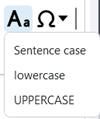
Change text case: You can use the new Change case toolbar control to change the case for the selected Text object or Text file object rich text content in the built-in Text editor and in the property pane editor. The options are Sentence case, lowercase, and UPPERCASE. For plain text, the control is only available in the built-in Text editor.
|
| TTSD-74026 |
Drawings |
Drawing 2D library: The 2D library now supports insulation drawing objects. |
| TTSD-74494 |
Drawings |
The Pattern line tool is now faster. |
| TTSD-74864 |
Drawings |
Create fabrication drawings (local): Creating fabrication drawings for cast units did not always work when you had selected the cast units using the Select parts selection switch and disabled the Creation review dialog. This issue has been fixed. |
| TTSD-74939 |
Drawings |
Weld marks: The background settings for weld marks are now correctly applied during drawing creation. |
| TTSD-75259 |
Drawings |
Earlier, in specific cases, changing the properties of rebar dimension marks for rebars in sloped parts could cause changes in dimensions to part edge. This issue has been fixed. |
| TTSD-75348, TTSD-71783 |
Drawings |
Cloning: Previously, when you cloned general arrangement drawings containing section views, the section views disappeared from the source drawing. This issue has now been fixed. Additionally, the cloning of section views in general arrangement drawings has been improved so that the content of the cloned section views now corresponds to the content of the selected model view. |
| TTSD-75365 |
Drawings |
Reinforcement ticks and tags: The status bar now shows the translated status bar messages. Previously, the status bar showed the untranslated placeholder texts. |
| TTSD-75735 |
Drawings |
If a precast part and a cast-in-place part were touching each other in the model, one of them disappeared from the drawing. This issue has been fixed. |
| TTSD-75753 |
Drawings |
Colors in drawings: RGB colors did not work for graphical objects in templates, such as lines, circles, and rectangles. This issue has been fixed. |
| TTSD-75763 |
Drawings |
Insulation: Earlier, when you had selected one of the insulation handles and modified the insulation alignment properties, the insulation handle remained selected incorrectly. This issue has been fixed. |
| TTSD-75925 |
Drawings |
Earlier, when working with the model and a general arrangement drawing simultaneously, placing a level mark in the drawing changed the current work plane in Tekla Structures. This issue has been fixed. |
| TTSD-74010 |
Tekla Model Sharing |
Tekla Model Sharing: Previously, when you excluded a model from the sharing service via the File menu, the confirmation message was not displayed. This issue has been fixed. |
| TTSD-74235 |
Tekla Model Sharing |
Previously, the shared model environment was sometimes incorrectly displayed as Custom instead of a local environment. This issue has been fixed. |
| TTSD-74964 |
Tekla Model Sharing |
With on-premises sharing services, the previously added on-premises servers were not visible in the list of services. This issue has been fixed, and the previously added servers are visible in the list. |
| TTSD-74777 |
Reinforcement |
Previously, in selection filters, Start number was duplicated in the Reinforcing bar category. This issue has been fixed. |
| TTSD-64263 |
Modeling |
An issue was fixed where diagnosing and repairing previously deleted user-defined attribute values instead of converting them to the correct value type. Tekla Structures now first attempts to convert UDAs to the correct value type, and only then deletes any possible mismatched values. |
| TTSD-69478 |
Modeling |
Previously, text in Japanese and some other languages was not displayed correctly in the modeling view. This issue has been fixed. |
| TTSD-70627 |
Modeling |
Previously, when the work plane was set to a location other than the default plane and bolts were created using a part face, the bolts were positioned far from the selected part face. This issue has been fixed. |
| TTSD-72220 |
Modeling |
Previously, when a polybeam with a profile containing at least one very large dimension was created, and a new part view was created, for example, from the face of another object, the unwanted polybeam appeared in the new view. This has been fixed, and the view depth does not display these objects any more. |
| TTSD-73317 |
Modeling |
Previously, when modifying the dimension value of a contour plate by entering the value, the opposite side might also be modified, even when the adjacent and modified sides were not orthogonal. This issue has been fixed. |
| TTSD-74167 |
Modeling |
Tekla Structures model is now displayed correctly even when the view has a very narrow aspect ratio. |
| TTSD-74410 |
Modeling |
Trimble Connect: When XS_FIRM and XS_PROJECT are set to a Trimble Connect folder path, local sync files will no longer be deleted if there is an API failure or outage. However, if the folder does not exist in Trimble Connect, the files will be deleted. |
| TTSD-74639 |
Modeling |
Building hierarchy: Previously, when filtering the location breakdown structure, using the Building property did not work if the objects were under a building section. This issue has been fixed. |
| TTSD-74738 |
Modeling |
The number of unnecessary log entries generated by the property pane has been reduced. |
| TTSD-74749 |
Modeling |
Previously, Tekla Structures sometimes closed unexpectedly if a connection inserted a weld that had invalid profile information. This issue has been fixed. |
| TTSD-74775 |
Modeling |
In the property pane, when filtering properties using the search, the entries in the additional matches group did not always enable the Modify button. This issue has been fixed. |
| TTSD-74842 |
Modeling |
Building hierarchy: When using the Select assigned objects command, the objects assigned to a building hierarchy element are now shown as selected objects in the property pane. |
| TTSD-74845 |
Modeling |
Previously, the geometry data returned by Reinforcement.GetRebarComplexGeometries was in the current work plane for rebar groups and single bars, but in global coordinates for rebar sets. This inconsistency has now been fixed, and the geometry data for rebar sets is now returned in the current work plane. |
| TTSD-74847 |
Modeling |
Live Collaboration: When sharing clip planes and clip boxes in Live Collaboration sessions, the base point is now taken into consideration. |
| TTSD-74959 |
Modeling |
Previously, clipped objects appeared in the model view when the color theme was changed. This issue has been fixed.
|
| TTSD-74982 |
Modeling |
Previously, grids with mid gray grid lines on a black background had low visibility. This issue has been fixed. |
| TTSD-75292 |
Modeling |
When items were used to model cast-in-place structures, item solids were not clipped correctly if the items were not detailed, for example, by cuts. This resulted in incorrect geometry representation in model views and drawings, such as showing edges between adjacent item faces in continuous structures, and incorrect volumes if parts of the items were overlapping. This issue has been fixed. |
| TTSD-75359 |
Modeling |
An issue with listing folder contents in Trimble Connector for certain projects has been fixed. |
| TTSD-75382 |
Modeling |
Copying custom object UDA values in the property pane works now more reliably. |
| TTSD-75431 |
Modeling |
Autosaving: Sometimes, the username used as a suffix for drawing autosave metadata was different than for other autosaved files. This caused the dialog prompting to open either autosaved or manually saved model to be empty. This issue has been fixed. |
| TTSD-75487 |
Modeling |
Live Collaboration: When sharing markups in Live Collaboration sessions, the base point is now taken into consideration. |
| TTSD-75713 |
Modeling |
Previously, UDA values for certain custom objects, such as timber columns, could no longer be changed in the property pane. This issue has been fixed. |
| TTSD-75766 |
Modeling |
Autosaving: Previously, when an autosaved model was available, an empty autosave dialog was shown when using Spanish as the Tekla Structures language. This issue has been fixed. |
| TTSD-75997 |
Modeling |
Previously, moving grid plane handles was not possible when direct modification was switched off. This issue has been fixed.
|
| TTSD-74325 |
Licensing |
An informative error message is now shown when a user opens a model while signed in to Tekla Launcher and Tekla Structures with different Trimble Identities. |
| TTSD-75477, TTSD-75770 |
Core |
Trimble Visualizer has been updated to a newer version. |
| TTSD-75521 |
Core |
Previously, when you selected Close window on the Tekla Structures icon in the Windows taskbar, Tekla Structures could stop working unexpectedly instead of shutting down. This issue has been fixed, and Tekla Structures stability has been improved. |
| TTSD-75074 |
Tools and components |
Tekla Warehouse: Security has been improved through minor updates. |
| TSAC-9971 |
Numbering |
An issue was fixed with the Design group numbering dialog not opening. |
| TTSD-74259 |
Numbering |
Previously, the message "Numbering rebar sequences..." remained visible on the status bar after numbering was done. Now the message is removed when the Numbering preview dialog is opened. |
| TSAC-8632, TSAC-8577 |
Import, export, interoperability (steel) |
DSTV to DXF converter: Slotted holes are now created in the DXF files also on the back of the plates. |
| TSAC-8394 |
Import, export, interoperability (concrete) |
BVBS export: A mesh created from a rebar assembly now has its position set to the rebar assembly position instead of an arbitrary number. |
| TSAC-8396 |
Import, export, interoperability (concrete) |
BVBS export: The Rebar assembly type selected in the Rebar assembly properties will now be used as the rebar assembly type parameter in the header block of the exported BVBS file. |
| TSAC-9941 |
Import, export, interoperability (concrete) |
Export Unitechnik (79): Previously, incorrect data was exported for reinforcement that was exported as embed. This issue has been fixed. |

 열에 표시됩니다.

 버튼을 사용하여 문서 관리자에서 도면을 업로드합니다.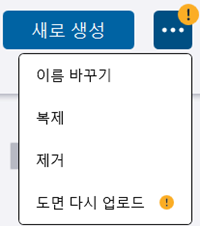
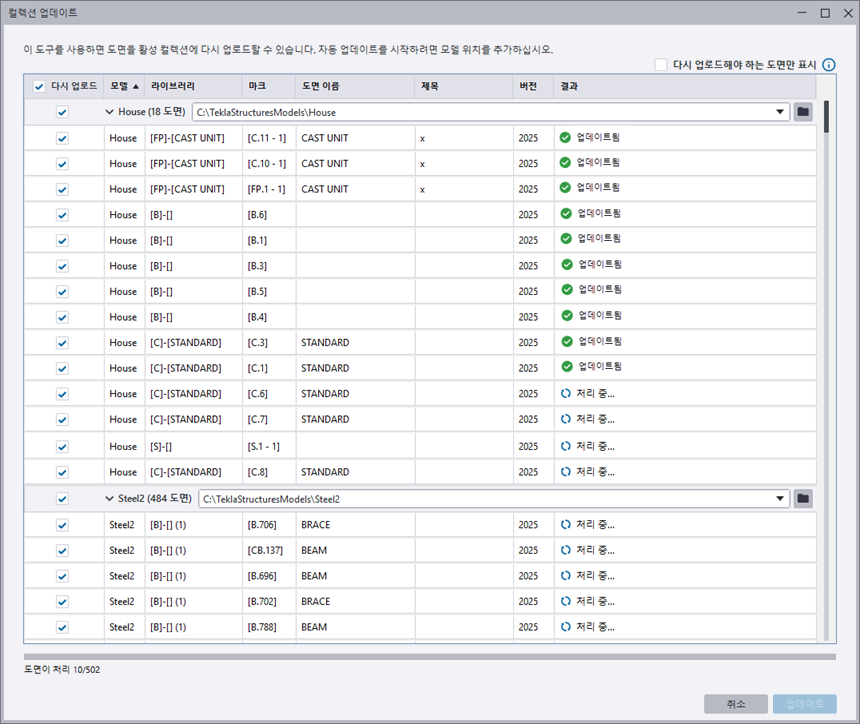
 처리 중 메시지가 표시됩니다. 대화 상자 하단의 업로드 프로세스를 따라할 수 있습니다.
  업데이트됨으로 변경되고 취소 버튼이 닫기 버튼으로 변경됩니다.