Tekla Structures 2026 SP1

Tekla Structures
Modificato: 10 Apr 2026
2026
Tekla Structures

Tekla Structures 2026 SP1

Il Service Pack di Tekla Structures più recente e gli installer d'ambiente aggiornati sono disponibili in Trimble Downloads.

Si consiglia di installare la versione più recente del service pack di Tekla Structures.

Scarica Tekla Structures

Conversione automatica delle estensioni di Tekla Structures da 32 bit a 64 bit

A partire Tekla Structures 2026, sono supportati solo i pacchetti di estensione di Tekla Structures a 64 bit (.tsep). Di conseguenza, le estensioni che avevano il flag preferito a 32 bit nelle versioni precedenti non sono più compatibili con Tekla Structures 2026. Per mantenere la funzionalità di tali estensioni, Tekla Structures può ora convertire automaticamente le estensioni a 64 bit per renderle compatibili con Tekla Structures 2026.

È possibile disattivare facoltativamente la conversione automatica impostando l'opzione avanzata XS_SKIP_CONVERTING_EXTENSION_APPS_TO_X64 su TRUE nel file options.ini.

Rilascio automatico delle licenze quando si cambia utente

Il pulsante Cambia utente nella schermata iniziale di Tekla Structures ora rilascia automaticamente tutte le licenze riservate sul computer dell'utente per la versione di Tekla Structures attualmente in uso. Le licenze riservate in altre versioni di Tekla Structures non vengono rilasciate. Mantenere una licenza riservata in una versione diversa mentre si cambia utente può causare conflitti di sistema.

TTSD-62768

Risolto un problema di trasparenza quando veniva visualizzata la linea centrale della parte

In precedenza, quando veniva visualizzata la linea centrale della parte, la bullonatura o la saldatura delle parti le rendeva trasparenti. Il problema è stato risolto.

TTSD-71363, TTSD-71558

Tekla Model Sharing: Download in background dei pacchetti non letti

I pacchetti non letti dal servizio di condivisione Tekla Model Sharing vengono ora scaricati e decompressi automaticamente in background. Ciò riduce il tempo di lettura perché alcuni pacchetti sono già memorizzati sull'unità locale. Il download automatico si avvia immediatamente quando un pacchetto si rende disponibile nel servizio di condivisione, a condizione che il modello Tekla Structures sia aperto. Tuttavia, le modifiche degli altri utenti di Tekla Model Sharing non verranno implementate finché non clicca su Leggi per completare il processo di lettura.

Per disattivare il download automatico dei pacchetti in background, accedere a File > Condivisione > Impostazioni di condivisione e deselezionare Scarica automaticamente il contenuto in background. Quando questa opzione è disattivata, il monitoraggio in background resta attivo, ma il download dei pacchetti non viene avviato in background.

TTSD-73471, TTSD-75317

Tekla Model Sharing: prestazioni migliorate

La scrittura in Tekla Model Sharing è stata ottimizzata per migliorare le prestazioni. Ora sono stati eliminati i controlli di verifica ridondanti (checksum) per i file di disegno e le istantanee, velocizzando la scrittura.

TTSD-66883

Corretto il problema della chiusura imprevista di Tekla Structures

In precedenza, Tekla Structures poteva chiudersi in modo imprevisto quando il modello si trovava su un'unità di rete e il pannello laterale Viste del modello era aperto. Il problema è stato risolto.

TTSD-75739

Modelli disegni: campi dei valori nelle intestazioni di pagina

In un modello di disegno, mancava un campo valore quando veniva utilizzato in un'intestazione di pagina con Utilizza colonne selezionato nelle proprietà dell'intestazione di pagina. Il problema è stato risolto.

TTSD-75762

Stato di caricamento del disegno PDF su Trimble Connect in Gestione documenti

Lo stato del caricamento del disegno PDF su Trimble Connect è ora mostrato in Gestione documenti in una colonna separata.

TTSD-74026

Clonazione migliorata delle viste sezioni e delle marche di livello

Le marche di livello sono ora clonate correttamente quando si clonano le viste sezioni nei disegni di progetto e montaggio. Le viste sezioni clonate visualizzano anche correttamente le informazioni sul piano di destinazione.

TTSD-53534

Spostamento delle viste disegno contenenti plug-in

Lo spostamento delle viste dei disegni contenenti plug-in da un disegno all'altro ora è più affidabile.

Per ulteriori informazioni sullo spostamento delle viste disegno in un altro disegno, vedere Copiare, spostare e collegare le viste disegno.

TTSD-38061

Sono consentiti valori più lunghi per le proprietà delle marche delle parti

Il limite di caratteri per i nomi delle proprietà delle marche delle parti e altri contenuti è stato portato a 1024 caratteri. Ciò consente riferimenti a proprietà più lunghi, come quelli utilizzati con l'integrazione del set di proprietà Trimble Connect (ad esempio, PSET.<Library_name>.<Property_set_name>.<Property>).

Per ulteriori informazioni sulle marche delle parti, vedere Proprietà delle marche.

TTSD-73274

Novità nei disegni di AI Cloud Fabrication (anteprima)

Il servizio Disegni di produzione AI Cloud è stato rilasciato inizialmente volta come funzionalità di anteprima in Tekla Structures 2025 ed è stato costantemente migliorato.

Raccolte: Ricaricamento dei disegni semplificato

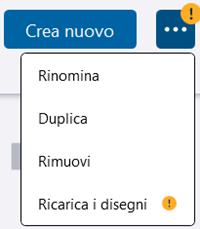
Tekla Structures 2026 SP1 introduce un sistema che avvisa se la raccolta include disegni che è consigliabile caricare nuovamente. Un punto esclamativo giallo viene visualizzato sul pulsante Raccolte nella finestra di dialogo Revisione creazione e sul pulsante delle opzioni nella finestra di dialogo Raccolte. La visualizzazione di questa icona indica che nel service pack più recente sono disponibili miglioramenti nella creazione di disegni, che possono essere applicati solo se i disegni vengono caricati nuovamente. Inoltre, è possibile utilizzare il nuovo strumento di ricaricamento per ricaricare i disegni senza dover aprire i modelli collegati.

La descrizione comando del pulsante Raccolte indica anche che sono disponibili aggiornamenti dei disegni e che è consigliato ricaricarli.

Sono disponibili due opzioni per caricare nuovamente:

  • Per ricaricare solo i disegni dal modello corrente, usare il normale pulsante con il simbolo + e caricare i disegni da Gestione documenti.
  • Per ricaricare i disegni che devono essere ricaricati da più modelli contemporaneamente, si consiglia di utilizzare la nuova e partica finestra di dialogo Aggiorna raccolta.

Si consiglia di ricaricare i disegni. La creazione dei disegni continuerà a funzionare normalmente, ma i miglioramenti e le correzioni più recenti dell'ultimo service pack potrebbero non essere implementati.

Ricaricamento dei disegni con Gestione documenti

Ora si possono ricaricare i disegni nella raccolta attiva dal modello corrente, proprio come se ne aggiungessero di nuovi.
  • È sufficiente selezionare i disegni da Gestione documenti e cliccare sul pulsante con il simbolo + nella finestra di dialogo Raccolte, come prima.

    • Se nella selezione sono presenti solo nuovi disegni, i disegni verranno caricati come di consueto.

    • I disegni obsoleti (parti mancanti, qualità ridotta e così via) verranno ignorati durante il caricamento.

    • Se la raccolta attiva contiene già altre versioni di alcuni dei disegni che si stanno aggiungendo, verrà visualizzata una finestra di dialogo in cui si chiede come si desidera aggiungere i disegni.

      Il disegno che si sta aggiungendo potrebbe essere stato creato con una versione precedente di Tekla Structures e caricato con una versione più recente di Tekla Structures oppure il disegno locale è stato modificato e salvato e ora risulta diverso dalla relativa versione sul cloud.

  • Selezionare le operazioni da eseguire:
    • Rimuovi e sostituisci: Elimina tutte le versioni esistenti dei disegni e le sostituisce con i nuovi disegni. L'aggiunta di disegni con una versione più recente di Tekla Structures non sarà compatibile se si utilizza una versione precedente di Tekla Structures.

    • Aggiungi nuove versioni: Aggiunge le nuove versioni dei disegni. In questo modo le versioni esistenti dei disegni non verranno rimosse.

Ricaricare i disegni utilizzando la finestra di dialogo Aggiorna raccolta

È possibile gestire e aggiornare in modo efficiente più disegni tramite un'interfaccia intuitiva che organizza i contenuti in base al modello e offre il tracking in tempo reale dell'avanzamento.

Nota: Se si utilizza la finestra di dialogo Aggiorna raccolta per ricaricare i disegni nel modello aperto al momento, si consiglia di salvare il modello in anticipo, in modo da poter recuperare lo stato più recente del disegno.
  • Per ricaricare i disegni esistenti con i dati più recenti, cliccare sul pulsante delle opzioni nella finestra di dialogo Raccolte e selezionare la nuova opzione Ricarica i disegni.
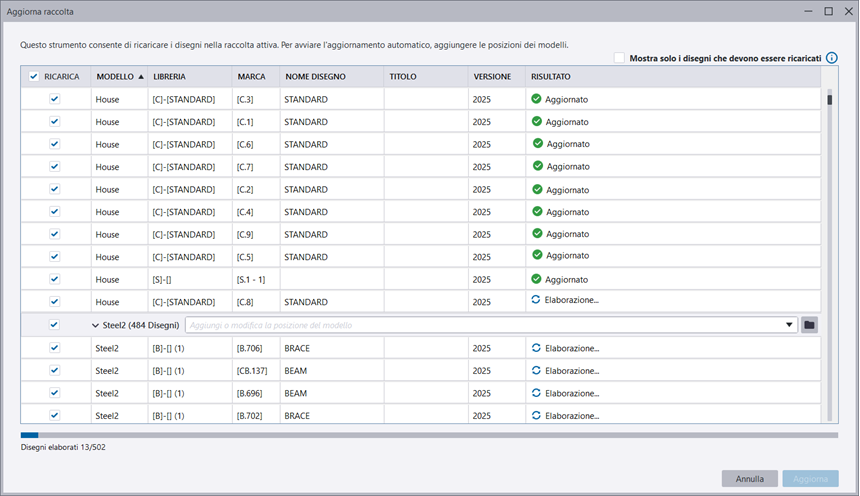
    La nuova finestra di dialogo Aggiorna raccolta elenca i disegni organizzati in base al modello, con i dati delle colonne ordinabili.

  • Definire le posizioni del modello. Per elencare solo i disegni obsoleti, selezionare la casella di controllo Mostra solo i disegni che devono essere ricaricati in alto. La versione Tekla Structures utilizzata per creare i disegni viene visualizzata nella colonna Versione.
  • Selezionare i disegni da caricare:
    • Per caricare solo i disegni selezionati, selezionare le caselle di controllo accanto ai disegni desiderati.

    • Per caricare tutti i disegni obsoleti in un modello, selezionare la casella di controllo accanto al modello.

    • Per caricare tutti i disegni obsoleti, selezionare la casella di controllo Ricarica nella riga del titolo.

  • Cliccare su Aggiorna e selezionare una delle seguenti opzioni:

    • Aggiorna raccolta esistente: I disegni obsoleti della raccolta verranno aggiornati con le nuove versioni. Questa opzione carica l'ultima versione del disegno ed elimina tutte le altre. Questa è l'opzione migliore se si desidera mantenere la struttura della raccolta corrente.
    • Duplica raccolta esistente: La raccolta attiva verrà duplicata e i disegni verranno caricati al suo interno. Selezionare questa opzione se si desidera mantenere separate le versioni originali.
  • Se il modello che include i disegni da ricaricare è quello aperto al momento, verrà richiesto di salvarlo per implementare le ultime modifiche e continuare con il caricamento. Cliccare su Salva.
  • Se il modello è stato creato in una versione Tekla Structures precedente e lo si salva, non sarà più possibile aprirlo in una versione Tekla Structures precedente. Verrà chiesto se si desidera continuare con il salvataggio. Cliccare su per continuare.

Il caricamento ha inizio e accanto ai disegni in fase di caricamento viene visualizzato il messaggio Elaborazione. È possibile seguire il processo di caricamento nella parte inferiore della finestra di dialogo.

È possibile annullare tutte le attività in corso cliccando su Annulla. L'operazione non annulla le modifiche già apportate nella raccolta corrente. Il messaggio Processo annullato viene visualizzato per tutte le righe in fase di elaborazione.

Dopo aver caricato i disegni, il messaggio cambia in Aggiornato e il pulsante Annulla diventa Chiudi.

Viene visualizzato un messaggio di errore, ad esempio quando:

  • Un disegno manca o non è disponibile.
  • Un percorso del modello è errato o mancante.
  • Il disegno non è aggiornato oppure si è verificato un errore di estrazione.
  • Si sono verificati alcuni errori tecnici.

Per ulteriori informazioni sul ricaricamento, vedere Gestire le raccolte e le librerie di disegni di produzione. Per altre informazioni sui disegni di fabbricazione di AI Cloud, vedere Creare disegni di fabbricazione utilizzando l'intelligenza artificiale e le raccolte cloud (anteprima).

TTSD-75742

Altri miglioramenti nei disegni di produzione AI Cloud

Alcuni testi nell'interfaccia utente erano in inglese anche se la lingua era stata modificata. Il problema è stato risolto.

TTSD-75068

Correzioni del connettore Tekla PowerFab

  • In Cronologia degli invii per l'esportazione di Tekla PowerFab, Emesso da è ora mostrato il nome corretto dell'emittente. In precedenza, veniva mostrato il nome dell'utente corrente, anche se non era l'emittente.

    TTSD-74431

  • In precedenza, durante l'esportazione di un pacchetto di fabbricazione con Disegni per approvazione esterna con un tipo di disegno selezionato, venivano esportati assemblaggi e pezzi aggiuntivi. Il problema è stato risolto.

    TTSD-74449

Correzioni

Apply
Numero di difetto Area di sviluppo Descrizione
TSAC-9900 Concrete components

Embedded anchors (008): Previously, in some situations, the Selected part option for anchor placement did not work properly. This issue has now been fixed.

TSAC-9901 Concrete components

Embedded anchors (008): Previously, in some situations, the component stopped working correctly when deployed on staircases. This issue has now been fixed.

TSAC-9969 Concrete components

Wall layout: Binding to grid level now works correctly in situations when only the top level offset is used. Also, the position of grid level binding is now correct when the wall layout coordinate system is not on the global coordinate system.

TSAC-7139 Steel components

Truss (S78): Previously, the first vertical beam was not affected by the rotation option specified for vertical beams. This issue has now been fixed.
 

TSAC-9371 Steel components

Railings (S77): Previously, when continuous profiles were used together with vertical middle rails, incorrect assemblies were created. This issue has now been fixed.

TSAC-9762 Steel components

Railings (S77): Previously, the rails were sometimes welded to incorrect stanchions. This issue has now been fixed.

TSAC-9812 Steel components

Bolted gusset (11): Previously, using the Split command on one of the secondary parts also affected the shape of the gusset. This issue has now been fixed.

TSAC-9866 Steel components

Tube gusset (20): Previously, the cut through the main part was not created correctly in some situations. This issue has now been fixed.

TSAC-9876 Steel components

Cold rolled overlap (1): Previously, stay plates were not created when the bottom flange plate was cut using a PEB end plate to the flange connection. This issue has now been fixed.

TSAC-9877 Steel components

Two sided end plate (142): Previously, haunch plates were not created correctly when you defined some specific haunch plate dimensions. This issue has now been fixed.

TSAC-9922 Steel components

Z Pan (S74): Previously, the top landing length was not applied correctly in some situations. This issue has now been fixed.

TSAC-9924 Steel components

Central bracing simple (51): Previously, incorrect flange cuts were created. This issue has now been fixed.

TSAC-9926 Steel components

Offshore (9): Previously, some notches were created incorrectly when the main part profile type was U. This issue has now been fixed.

TSAC-9928 Steel components

Stairs (S71): Previously, when using custom steps, the bolts connecting them to stringers were sometimes created incorrectly. This issue has now been fixed.
 

TSAC-9952 Steel components

Stiffened end plate (27): Previously, weld 9 was created in an incorrect location in some situations. This issue has now been fixed.

TSAC-9767 Import, export, interoperability

Layout manager: You can now use CUSTOM.LAYOUTPOINT_DELTA_X, CUSTOM.LAYOUTPOINT_DELTA_Y , CUSTOM.LAYOUTPOINT_DELTA_V, and CUSTOM.LAYOUTPOINT_DELTA_H attributes to report out-of-tolerance deviation values that Layout manager calculates between measured points and design points.

TSAC-9849 Import, export, interoperability

Layout manager: Design point symbols are now updated correctly when the tolerance settings are changed in the Layout manager Settings dialog.

TTSD-68390 Import, export, interoperability

IFC property sets: When creating property sets for the IFC export, you can now select and add also custom properties. Previously, only default attributes were available for selection.

TTSD-74160 Import, export, interoperability

IFC property sets: IFC property set names are no longer limited to being unique. Now multiple property sets can be created with the same name.

TTSD-74447 Import, export, interoperability

IFC4 export: Previously, some properties (Revision property, DRAWING.REVISION, DRAWING .ASSEMBLY, and DRAWING.CAST_UNIT) were not exported in the IFC4 export. This issue has been fixed.

TTSD-74795 Import, export, interoperability

Publish to Tekla Structural Designer: Updating the cloud model name has been enhanced in the Publish to Tekla Structural Designer dialog. The information in the Model description, Revision, and Revision description boxes is now preserved if the model name is edited manually.

TTSD-75003 Import, export, interoperability

IFC4 export: Previously, custom properties derived from assembly hierarchy were not exported through the IFC4 export. This issue has been fixed.

TTSD-75066 Import, export, interoperability

IFC4.3 export: Now, the IFC4.3 export also supports IfcBearing when the Reference view or Design transfer view export type is used.

TTSD-75732 Import, export, interoperability

IFC4 export: Sometimes, the export of custom properties did not work. This issue has been fixed.

TPLED-427 Templates and reports

Template Editor: When the first row of a table (row with Use Columns selected) could not fit into the page, the page height became incorrect, which disrupted the page layout. This issue has been fixed.

TSAC-9758 Drawings

View-specific dimensioning of bolts: The bolt side recognition now works correctly, and the bolting order no longer affects the dimensioning of only the selected sides.

TSAC-9777 Drawings

View-specific dimensioning: Now the Dimension to option 'center' also works for reinforcement.  The center point for dimensions of single rebars and rebar sets is taken from the polygon center. 

Image
Dimension to center
TSAC-9920 Drawings

View-specific dimensioning: Bolt groups are no longer dimensioned multiple times.

TTSD-70329 Drawings

Rebar marks: Rebar marks created with the Perpendicular leader lines option now align perpendicularly to the bars even when the bars are oriented diagonally. Previously, the rebar marks did not always follow the orientation of the bars.

TTSD-70408 Drawings

The performance of modifying the size of the drawing view frame has been improved. Additionally, a specific performance improvement has been made for modifying drawing views that contain multiple instances of the Object dimensioning tool plugin.

TTSD-70483 Drawings

Symbols are now positioned correctly in drawing templates. Previously, symbols were occasionally drawn slightly off from the correct location due to inaccuracies in the placement calculation.

TTSD-72237 Drawings

Sometimes, the property pane did not show the properties of the selected object when you edited a model and a general arrangement drawing side by side and switched between the modes. This issue has been fixed.

TTSD-73068 Drawings

Rebar dimension marks: When modifying an existing rebar dimension mark, the Include rebar mark setting and the related properties are now disabled if a rebar mark already exists.

TTSD-73475 Drawings

Previously, Trimble Connect related settings were visible in the Print drawings dialog when printing to a printer or a plot file. This issue has been fixed, and those settings are only visible when printing to a PDF file.

TTSD-73709 Drawings

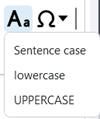
Change text case: You can use the new Change case toolbar control to change the case for the selected Text object or Text file object rich text content in the built-in Text editor and in the property pane editor. The options are Sentence caselowercase, and UPPERCASE. For plain text, the control is only available in the built-in Text editor.

Image
Change text case
TTSD-74026 Drawings

Drawing 2D library: The 2D library now supports insulation drawing objects.

TTSD-74494 Drawings

The Pattern line tool is now faster. 

TTSD-74864 Drawings

Create fabrication drawings (local): Creating fabrication drawings for cast units did not always work when you had selected the cast units using the Select parts selection switch and disabled the Creation review dialog. This issue has been fixed.

TTSD-74939 Drawings

Weld marks: The background settings for weld marks are now correctly applied during drawing creation.

TTSD-75259 Drawings

Earlier, in specific cases, changing the properties of rebar dimension marks for rebars in sloped parts could cause changes in dimensions to part edge. This issue has been fixed.

TTSD-75348, TTSD-71783 Drawings

Cloning: Previously, when you cloned general arrangement drawings containing section views, the section views disappeared from the source drawing. This issue has now been fixed. Additionally, the cloning of section views in general arrangement drawings has been improved so that the content of the cloned section views now corresponds to the content of the selected model view.

TTSD-75365 Drawings

Reinforcement ticks and tags: The status bar now shows the translated status bar messages. Previously, the status bar showed the untranslated placeholder texts.

TTSD-75735 Drawings

If a precast part and a cast-in-place part were touching each other in the model, one of them disappeared from the drawing. This issue has been fixed.

TTSD-75753 Drawings

Colors in drawings: RGB colors did not work for graphical objects in templates, such as lines, circles, and rectangles. This issue has been fixed.

TTSD-75763 Drawings

Insulation: Earlier, when you had selected one of the insulation handles and modified the insulation alignment properties, the insulation handle remained selected incorrectly. This issue has been fixed.

TTSD-75925 Drawings

Earlier, when working with the model and a general arrangement drawing simultaneously, placing a level mark in the drawing changed the current work plane in Tekla Structures. This issue has been fixed.

TTSD-74010 Tekla Model Sharing

Tekla Model Sharing: Previously, when you excluded a model from the sharing service via the File menu, the confirmation message was not displayed. This issue has been fixed.

TTSD-74235 Tekla Model Sharing

Previously, the shared model environment was sometimes incorrectly displayed as Custom instead of a local environment. This issue has been fixed.

TTSD-74964 Tekla Model Sharing

With on-premises sharing services, the previously added on-premises servers were not visible in the list of services. This issue has been fixed, and the previously added servers are visible in the list.

TTSD-74777 Reinforcement

Previously, in selection filters, Start number was duplicated in the Reinforcing bar category. This issue has been fixed.

TTSD-64263 Modeling

An issue was fixed where diagnosing and repairing previously deleted user-defined attribute values instead of converting them to the correct value type. Tekla Structures now first attempts to convert UDAs to the correct value type, and only then deletes any possible mismatched values.

TTSD-69478 Modeling

Previously, text in Japanese and some other languages was not displayed correctly in the modeling view. This issue has been fixed.

TTSD-70627 Modeling

Previously, when the work plane was set to a location other than the default plane and bolts were created using a part face, the bolts were positioned far from the selected part face. This issue has been fixed.

TTSD-72220 Modeling

Previously, when a polybeam with a profile containing at least one very large dimension was created, and a new part view was created, for example, from the face of another object, the unwanted polybeam appeared in the new view. This has been fixed, and the view depth does not display these objects any more.

TTSD-73317 Modeling

Previously, when modifying the dimension value of a contour plate by entering the value, the opposite side might also be modified, even when the adjacent and modified sides were not orthogonal. This issue has been fixed.

TTSD-74167 Modeling

Tekla Structures model is now displayed correctly even when the view has a very narrow aspect ratio.

TTSD-74410 Modeling

Trimble Connect: When XS_FIRM and XS_PROJECT are set to a Trimble Connect folder path, local sync files will no longer be deleted if there is an API failure or outage. However, if the folder does not exist in Trimble Connect, the files will be deleted.

TTSD-74639 Modeling

Building hierarchy: Previously, when filtering the location breakdown structure, using the Building property did not work if the objects were under a building section. This issue has been fixed.

TTSD-74738 Modeling

The number of unnecessary log entries generated by the property pane has been reduced.

TTSD-74749 Modeling

Previously, Tekla Structures sometimes closed unexpectedly if a connection inserted a weld that had invalid profile information. This issue has been fixed.

TTSD-74775 Modeling

In the property pane, when filtering properties using the search, the entries in the additional matches group did not always enable the Modify button. This issue has been fixed.

TTSD-74842 Modeling

Building hierarchy: When using the Select assigned objects command, the objects assigned to a building hierarchy element are now shown as selected objects in the property pane.

TTSD-74845 Modeling

Previously, the geometry data returned by Reinforcement.GetRebarComplexGeometries was in the current work plane for rebar groups and single bars, but in global coordinates for rebar sets. This inconsistency has now been fixed, and the geometry data for rebar sets is now returned in the current work plane.

TTSD-74847 Modeling

Live Collaboration: When sharing clip planes and clip boxes in Live Collaboration sessions, the base point is now taken into consideration.

TTSD-74959 Modeling

Previously, clipped objects appeared in the model view when the color theme was changed. This issue has been fixed.
 

TTSD-74982 Modeling

Previously, grids with mid gray grid lines on a black background had low visibility. This issue has been fixed.

TTSD-75292 Modeling

When items were used to model cast-in-place structures, item solids were not clipped correctly if the items were not detailed, for example, by cuts. This resulted in incorrect geometry representation in model views and drawings, such as showing edges between adjacent item faces in continuous structures, and incorrect volumes if parts of the items were overlapping. This issue has been fixed.

TTSD-75359 Modeling

An issue with listing folder contents in Trimble Connector for certain projects has been fixed.

TTSD-75382 Modeling

Copying custom object UDA values in the property pane works now more reliably.

TTSD-75431 Modeling

Autosaving: Sometimes, the username used as a suffix for drawing autosave metadata was different than for other autosaved files. This caused the dialog prompting to open either autosaved or manually saved model to be empty. This issue has been fixed.

TTSD-75487 Modeling

Live Collaboration: When sharing markups in Live Collaboration sessions, the base point is now taken into consideration.

TTSD-75713 Modeling

Previously, UDA values for certain custom objects, such as timber columns, could no longer be changed in the property pane. This issue has been fixed.

TTSD-75766 Modeling

Autosaving: Previously, when an autosaved model was available, an empty autosave dialog was shown when using Spanish as the Tekla Structures language. This issue has been fixed.

TTSD-75997 Modeling


Previously, moving grid plane handles was not possible when direct modification was switched off. This issue has been fixed.

TTSD-74325 Licensing

An informative error message is now shown when a user opens a model while signed in to Tekla Launcher and Tekla Structures with different Trimble Identities.

TTSD-75477, TTSD-75770 Core

Trimble Visualizer has been updated to a newer version.

TTSD-75521 Core

Previously, when you selected Close window on the Tekla Structures icon in the Windows taskbar, Tekla Structures could stop working unexpectedly instead of shutting down. This issue has been fixed, and Tekla Structures stability has been improved.

TTSD-75074 Tools and components

Tekla Warehouse: Security has been improved through minor updates.

TSAC-9971 Numbering

An issue was fixed with the Design group numbering dialog not opening.

TTSD-74259 Numbering

Previously, the message "Numbering rebar sequences..." remained visible on the status bar after numbering was done. Now the message is removed when the Numbering preview dialog is opened.

TSAC-8632, TSAC-8577 Import, export, interoperability (steel)

DSTV to DXF converter: Slotted holes are now created in the DXF files also on the back of the plates.

TSAC-8394 Import, export, interoperability (concrete)

BVBS export: A mesh created from a rebar assembly now has its position set to the rebar assembly position instead of an arbitrary number.

TSAC-8396 Import, export, interoperability (concrete)

BVBS export: The Rebar assembly type selected in the Rebar assembly properties will now be used as the rebar assembly type parameter in the header block of the exported BVBS file.

TSAC-9941 Import, export, interoperability (concrete)

Export Unitechnik (79): Previously, incorrect data was exported for reinforcement that was exported as embed. This issue has been fixed.

È stato utile?
Invia
Precedente
Successivo