Dokumentace je předběžný návrh. Obsah se může změnit pro oficiální vydání.

Contact support

Modified: 8 Zář 2023 Tekla PowerFab 2026i

Contact support

You can contact support directly from Tekla PowerFab using the support tool. You can launch the tool directly from an error dialog or from the About dialog.

In the tool, you can describe the issue, and attach error logs, and database backups.

If there is a crashing error, the tool automatically launches the ticket-creation dialog.

Create a support ticket

This step-by-step procedure instructs you how to contact support using the About dialog. You can also contact support directly from an error dialog.
  1. Click the About ribbon tab.

    The About dialog opens.

  2. Click Create Support Ticket.

    The Contact support dialog opens.
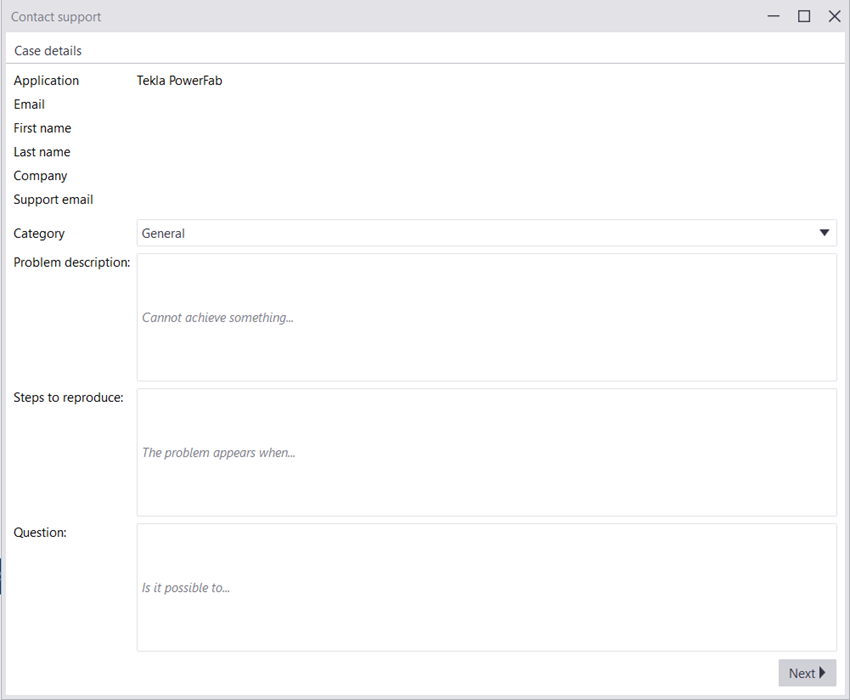
  3. Type the details of your issue or questions and click Next >.

    In the description, include the version of the program, if it is on the server or client, and if the issue is occurring on multiple machines.

  4. Select the information to be attached.

    To add files or crash dump files, click Add extra files or Add crash dumps and select the relevant files.

  5. Click Next >.
  6. Check the Case summary.
  7. If you are satisfied with your ticket, click Create case.

    Otherwise, click Back, and modify your ticket as desired.

Bylo to užitečné?
Odeslat
Předchozí
Další