
What's new in components in Tekla Structures 2026
There are many improvements in concrete components and steel components in Tekla Structures 2026. In the Tekla Structures Graphite configuration, detailing components can now be created in the same way as in the Tekla Structures Diamond configuration.
Concrete components
| Component | What's new |
|---|---|
|
Braced girder (88), (89) |
On the UDA tab, there are now six new variable UDAs where you can define the type, value, name, and the object a UDA belongs to. TSAC-9292, TSAC-9293 |
|
Concrete console (110) |
|
|
Edge and corner reinforcement (62) |
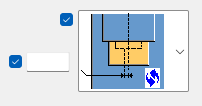
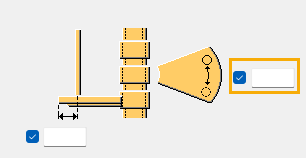
On the Picture tab, there is a new setting that you can use to switch the position of vertical U bars with horizontal U bars. TSAC-9190 |
|
Floor layout |
|
|
Hole reinforcement for slabs and walls (84) |
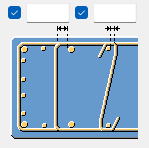
On the Edge bars tab, you can now select from all available spacing types when defining spacing for each edge bar group. TSAC-8159 |
|
Hollowcore reinforcement strands (60) |
You can now define the strand codes in a .dat file. TSAC-8402 |
|
Mesh bars / Mesh bars by area |
When you select Mesh as the bar creation type on the Picture tab, you can now use the new Mesh outline at part edge cuts setting on the Detailing tab to define how the cuts at the edges of the parent concrete object are handled in mesh creation. Mesh outline at part edge cuts has the following two options:
TSAC-9713 |
|
Pad footing reinforcement (77) |
On the Lacer bar tab, you can now use the new Local coordinate system setting to define the creation plane for the lacer bars, using the local coordinate system of the pad footing. Select Yes to ensure that lacer bars always have the same orientation and position on any On plane rotation as the pad footing. TSAC-9568 |
|
Rectangular column reinforcement (83) |
On the Intermediate links tab, you can now define the cover thickness between the intermediate links and tied side bars.
TSAC-8163 |
|
Seating with dowel (75) |
TSAC-7982, TSAC-8476 |
|
Seating with dowel to flange (77) |
On the Parts tab, you can now define to which cast unit the bearing pad is attached. TSAC-8476 |
|
Stirrup reinforcement (67) |
On the Parameters tab, the Rotate rebar polygon functionality has been enhanced. There are now two methods available:
TSAC-7450 |
|
Two sided seating with dowel (76) |
TSAC-7982, TSAC-8476 |
|
Wall layout |
|
|
Rebar sequence numbering |
This macro has been removed from the Applications & components catalog. Starting from Tekla Structures 2025, to assign running numbers to various reinforcement objects within each cast unit or pour, define reinforcement sequence numbering settings in the Numbering Setup dialog. Then, use any regular numbering command, such as Number modified objects or Number series of selected objects, to update the numbering in the model. TTSD-72545 |

Steel components
| Component | What's new |
|---|---|
|
Base plate (1004) |
|
|
Beam prep (183) |
You can now select whether a 0.3 mm tolerance is used in weld access hole cuts. This tolerance is used to prevent solid errors when cutting the beam. TSAC-8981 |
|
Bearing plate (7) |
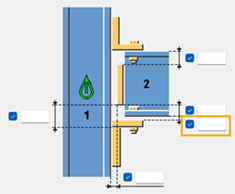
On the Picture tab, you can now define the vertical offset of the shim plate from the secondary part edge.
On the Parts tab, you can now define the numbering prefix and start number, material, and name for the bottom seat profile. TSAC-9323, TSAC-9763 |
|
Bolted gusset (11) |
|
|
Bracing wrap around (46) |
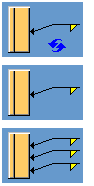
Previously, the component had only one weld row for all the welds created by component. This issue has now been fixed and the different welds have been separated. Also, on the Parameters tab, it is now possible to specify the weld arrangement for welds between the clip angles and the input parts or the gusset. Select whether one weld or three welds are created. TSAC-5175 |
|
Bracing wrap around 2 (53) |
Previously, the component had only one weld row for all the welds created by component. This issue has now been fixed and the different welds have been separated. Also, on the Parameters tab, you can now specify the weld arrangement for welds between the clip angles and the input parts or the gusset. Select whether one weld or three welds are created. TSAC-8911 |
|
Cast-in plate (1069) |
On the Studs/Anchors tab, you can now create studs as custom components or items. TSAC-9613 |
|
Clip angle (141) |
On the Bolts tab, there is now a new option for welds that connect the clip angle to the main and/or secondary part.
Use the new option to create one weld on the vertical part of the clip angle with a small section on the top of the clip angle. You can define the size of this section. The default is 2 x weld size. TSAC-9384 |
|
Column site weld splice (137) |
On the Gussets tab, there are now more chamfer shape options available for gusset plates. The new options are:
TSAC-9363 |
|
Column tube seating (100) |
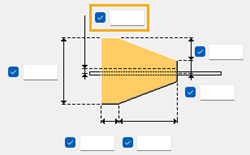
On the Bolts tab, you can now specify the bolt offset, and the horizontal and vertical position of bolts. Previously, you defined bolt edge distances, and the number of bolts and bolt spacing on the Picture tab. TSAC-9522 |
|
Corner tube gusset (56), Corner bolted gusset (57), Corner wrapped gusset (63) |
On the Gusset tab, it is now possible to create chamfers on the gusset plate where the gusset edges connect to the main part or last secondary part.
TSAC-9243 |
|
Corner bolted gusset (57) |
On the Stiffeners tab, you can now define stiffener plates as profiles. TSAC-8898 |
|
Corner wrapped gusset (63) |
|
|
End plate (101), End plate with compensating flange plates (111) |
On the Bolts tab, you can define the bolting direction. TSAC-9600 |
|
End plate (101), End plate - Comp flange (111), Stiffened notch (1006), Fitting (13), New notch (49), Welded beam to beam (123) |
You can now specify the radius for the notch cut. TSAC-9337 |
|
End plate detail (1002) |
On the Parts tab, you can now select whether to offset the start and end of welds when the main part is a rectangular hollow section. When the welds are offset, the end plate is not welded to the main part radius. Also, weld 4 has been added to control the four sides of the rectangular hollow sections separately. TSAC-9385 |
|
Full depth S (185) |
On the Plates tab, you can now define the inner bottom edge chamfer of the shear tab. TSAC-9066 |
|
Haunch (40) |
On the Parameters tab, you can now select the chamfer shape for all four corners of compression stiffeners. You can now also select to use a square chamfer. TSAC-8852 |
|
Hollowbrace wraparound gusset (59) |
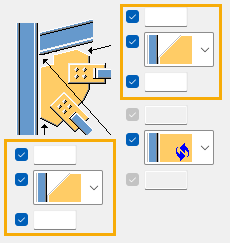
On the Gusset conn 1 and Gusset conn 2 tabs, you can now specify the weld arrangement for welds between the clip angles and the parts or gusset. Select whether one weld or three welds are created.
TSAC-8913 |
|
Joining plates (14) |
On the Bolts tab, you can now use the Slots in setting to specify the parts in which slotted holes are created. TSAC-8734 |
|
Joining plates (14), Seating (30), Stub connection (119) |
On the Bolts tab, you can now define the bolting direction. TSAC-9438 |
|
Joist to column, type 1 (161) |
On the Stb Ang Blts tab, you can now define the cut length for stabilizer angle bolts. TSAC-9305 |
|
Multiple stiffeners (1064) |
You can now create galvanizing holes in stiffeners on the new Holes tab. TSAC-9437 |
|
New notch (49) |
It is now possible to create welds 5 and 6 between the main part flanges and the secondary part. TSAC-9673 |
|
Notched seating (9) |
On the Parameters tab, you can now select whether weld 1 is created as a polygon weld. TSAC-9260 |
|
Railings (S77) |
|
|
Seating (30) |
On the Bolts tab, you can now define which bolts are deleted from the bolt group. TSAC-9759 |
|
Shear plate column with stiffener special (42) |
On the Stiffeners tab, you can now define the distance between stiffener plate edges and primary part flanges. TSAC-7811 |
|
Shear plate to tube column (47) |
Weld 1 has been improved so that it is now created on both sides of the main part. Also, on the Parameters tab, you can now define the Weld start and end offset. TSAC-9381 |
|
Shear plate tube column (189) |
On the Plates tab, you can now define plates washers for bolts and select the plate washer side. TSAC-9707 |
|
Simple base plate 2 (1031) |
On the Picture tab, you can now define different chamfer types at the corners of the base plate. TSAC-9389 |
|
Simple bolt connection (5) |
On the Picture tab, you can now select in the Create fitting setting whether the secondary part is fitted. TSAC-9068 |
|
Spiral stair (68) |
On the Stanchions tab, you can now move the stanchions around the stair spiral by a given distance. TSAC-9249 |
|
Splice type 1 (56) |
The component now works with Z profiles. TSAC-8246 |
|
Spiral stair (68) |
On the Stanchions tab, you can now define to move the stanchion around the spiral stair by a given distance.
TSAC-9249 |
|
Stairs (S71) |
|
|
Stairs (S71), Wooden steps pan (S72), Polybeam pan (S73) |
On the Stair setup tab, you can now select to create plate stringers as one continuous plate. TSAC-9314 |
|
Stanchions (S76) |
On the Parts tab, you can now create stanchions as twin profiles. TSAC-7808 |
|
Stiffened end plate (27) |
Horizontal stiffeners have been improved. On the Parts tab, there is a new setting Create horizontal stiffeners where you can select if only top, only bottom, or both stiffeners are created. You can also specify to which part the stiffeners are welded using the Weld horizontal stiffeners to setting. On the Parameters tab, there are now separate chamfer settings for horizontal stiffeners. TSAC-9310 |
|
Stiffened notch (1006) |
On the Picture tab, you can now define the stiffener offset from the end of the beam and the beam cut tolerance. TSAC-4981 |
|
Stiffeners (1003) |
On the Parameters tab, you can now specify whether the left stiffener and right stiffener are created. TSAC-9509 |
|
Stringer to channel (127) |
On the Parts tab, you can now define the width and height of the vertical plate. TSAC-8802 |
|
Tensioner brace (13), Tensioner brace and compression bar (13) |
You can now also use custom components for the tensioner component connections. You can select the components from the Applications & components catalog on the Joints tab. TSAC-8626 |
|
Triangles generation (19) |
|
|
Tube crossing (22) |
On the Picture tab, you can now define the brace length on the connection plate and the end plate edge distance from the gusset plate separately for both secondary parts. On the Brace conn tab, you can now define the distance between the cover plate and the secondary part. TSAC-7280 |
|
Tube gusset (20) |
|
|
Tube rail (113) |
Bolts are now placed symmetrically when you have selected to create a continuous rail on the Parameters tab. TSAC-8264 |
|
Tube splice (6), Joining plates (14), Tube gusset (20), Tube crossing (22) |
On the Parts, you can now define the Class property for all parts. TSAC-9196 |
|
Unfold surface (21) |
On the UDA tab, you can now define that the component GUID and unfolded part GUIDs are copied as UDAs to the original parts. TSAC-9695 |
|
U.S. Base plate (1047) |
On the Parts tab, you can now define the Class property of the Key profile. TSAC-9699 |
|
Web stiffened base plate (1016) |
You can now define the Class property for all parts. TSAC-9197 |
|
Welded tee (32) |
The following improvements have been made:
TSAC-7141 |
|
Wraparound gusset (58) |
|
|
Wraparound gusset cross (60) |
On the Brace conn tab, you can now select whether the brace ends are cut bevel or square.
TSAC-9253 |
|
Z Pan (S74) |
|


Change in creating components in the Tekla Structures Graphite configuration
When using the Tekla Structures Graphite configuration, you can now create detailing components in the same way as when using the Tekla Structures Diamond configuration. Previously, you could only create conceptual components in the Tekla Structures Graphite configuration. This change enables a smooth workflow across the different Tekla Structures configurations without the risk of breaking the numbering of parts created by components. Administrators can control this new way of working with the XS_USE_CONCEPTUAL_COMPONENTS_FOR_GRAPHITE advanced option.
TTSD-73370