
XS_ENABLE_OVERLAPPING_CUT_LINE_REMOVAL
Category in Advanced options dialog: Drawing properties
This advanced option controls the
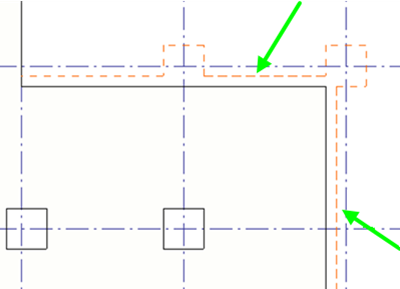
removal of overlapping cut or non-solid lines. It is by default set to TRUE, and the
overlapping cut and non-solid (dashed, dash-and-dot) lines are removed.
Note:
If there are dashed lines from a reference model and from a part in the same location, it is totally random which one is deleted and which one stays visible when XS_ENABLE_OVERLAPPING_CUT_LINE_REMOVAL is set to TRUE.
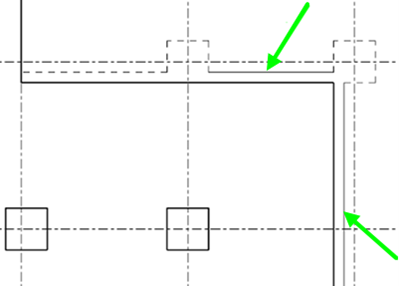
We do not recommend setting this advanced option to FALSE. If you do that, the cut and non-solid lines may become misaligned and look like solid lines in drawings, and hidden objects may be presented as not hidden, for example.
This advanced option does not remove cut or non-solid lines that are added manually to the drawing.
XS_ENABLE_OVERLAPPING_CUT_LINE_REMOVAL set to TRUE:
XS_ENABLE_OVERLAPPING_CUT_LINE_REMOVAL set to FALSE:
This advanced option is model specific and the setting is saved in the options database.