
Tower diagonal (S66)
Creates bracing panels between 2 or 4 existing columns.
Profiles
Bracing: L, flat, U, twin
Parts created
-
Horizontal braces
-
Diagonal braces
Use for
|
Situation |
Description |
|---|---|
|
|
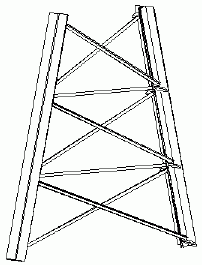
Before you start
Create 2 or 4 tower legs.
Defining properties
Use the following tabs in the component dialog box to define the properties of the parts this component creates:
|
Tab |
Contents |
See also |
|---|---|---|
|
Picture |
Dimensions that define the location of diagonal braces, quantity of bracing panels. |
|
|
Parts |
Part properties of the horizontal and diagonal braces. |
|
|
Parameters |
Options that define the type of bracing to create. |
|
|
Twin Profiles |
Option to create twin-profile braces, position of twin profiles. |
|
|
Model Points |
Option to create construction points, construction point properties. |
|
|
Joints |
Components to use to connect braces to tower legs. |
Picking order
-
Pick the tower legs clockwise, starting with the top left leg:
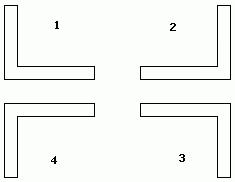
-
Click the middle mouse button to create the component