
Manage global production codes
In the Global Production Code Maintenance dialog box, you can create, modify, and delete production codes that are available in all production control and estimating jobs.
Production codes link items or groups of items in an estimating job to items or groups of items in a production control job. They are used to group together material with similar work and to apply labor averages from estimating to the production control bill of materials.
Tekla PowerFab calculates the labor times based on the production code. This means that using production codes allows you to plan production more accurately.
Note: You can only adjust production
codes in the Global Production Code
Maintenance dialog box, not labor times. Tekla
PowerFab automatically calculates
the labor times for the items that have been assigned a production code.
We recommend that you assign matching production codes to parts in both Estimating and Production Control. This way, you can view the planned and executed labor times in the project schedule.
Individual estimating or production control jobs may override properties of a production code for an individual job or may add additional production codes to be available on a narrower basis.
See also the following information:
Access Global Production Code Maintenance dialog box
-
On the menu, select.
The Global Production Code Maintenance dialog box opens.
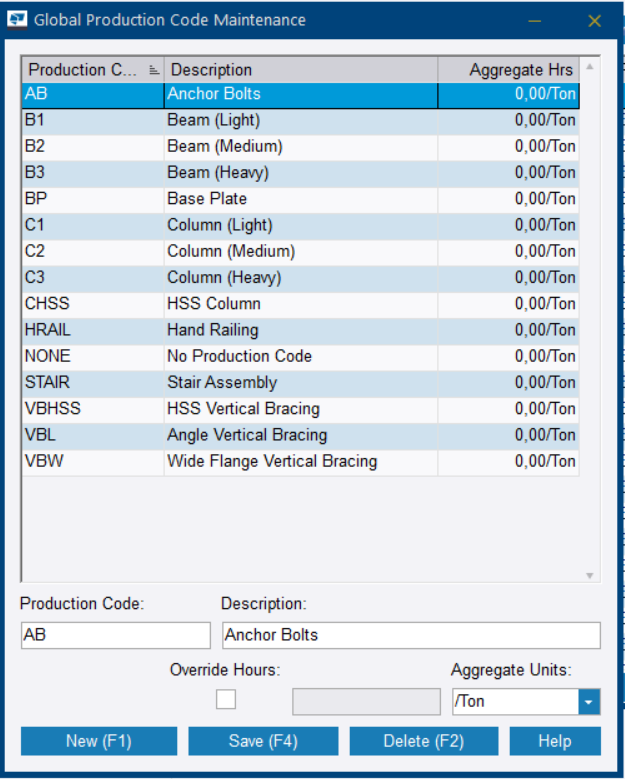
Production Code: An abbreviation for the production code
Description: A description for the production code. For example, you can use B1 for beams or C1 for columns.
Override Hours: Select if you want to use aggregate units for the planned hours instead of the original estimated hours. Then type the hours in the field.
However, if the manual override is used, the labor information does not include labor group percentages. Therefore, the labor group percentages cannot be applied to any production control stations.
Further, the information cannot be applied to tasks in the project schedule and to resources that feed information to the production schedule.
Manually overriding hours can also prevent you from comparing the linked production control job with the estimating job.
An override applied in a production control job does not affect the estimate nor global information. The estimated hours are always created in the estimate. They are not overwritten by the production code properties.
Aggregate Units: Select the suitable units in the drop-down menu.
The hours associated with the production codes are only used in Production Control. Production codes do not affect or apply labor to estimating items. The purpose of the hours is to pull labor information from the estimate in the form of hours per ton and labor percentages by labor group.
Create a production code
The new production code is added.
Modify a production code
- Select the production code that you want to modify.
- Modify the properties.
- To update the production code properties, click Save.
Delete a production code
- Select the production code that you want to delete.
- Click Delete.
- In the confirmation dialog box, click Yes to permanently delete the production code.