
Manage default shipping routes
Shipping routes determine where each assembly needs to be shipped to. You can create, modify, and delete shipping routes that are available for all production control jobs in the Shipping Route Maintenance dialog box.
Shipping routes can be used to send items within a job to multiple shipping destinations, including intermediate destinations, such as sending material to an external galvanizer. Items that are returned from one destination can then be shipped to another destination.
The initial location of all items is the shop location. If no shipping route is assigned for items, the items will be shipped from the shop to the jobsite. Items can either be returned to the shop and be added to another load with other material items, or shipped from the intermediate destination directly to the jobsite or next destination.
Shipping route properties
You can modify the shipping route properties in the Shipping Route dialog box that opens when you create a new route and modify the properties of an existing route in .
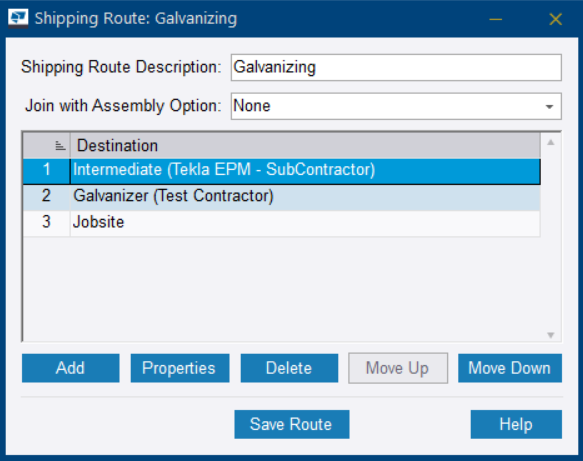
Shipping Route Description: Type a description for the shipping route.
Join with Assembly Option: Select if and when the weight of an accessory part is included in the shipping
weight of the assembly.
- None: The weight of the accessory is not included in the shipping weight of the assembly. If the Jobsite destination is in the shipping route, select the None option.
- Join with assembly for first destination: The weight of the accessory is joined to the shipping weight of the assembly for all of its destinations except for the first one.
- Join with assembly for...: The weight of the accessory is included in the shipping weight of the assembly for the destination that you select in the Join with Assembly For list, and for any other destinations after that one.
- Join with assembly after...: The weight of the accessory is included in the shipping weight of the assembly for all destinations after the destination you select in the Join With Assembly After list.
Add: Opens the Shipping Destination Properties dialog box for adding a new destination.
Properties: Opens the Shipping Destination Properties dialog box for modifying an existing destination.
Delete: Removes the selected destination from the shipping route.
Move Up/Move Down: Moves the selected destination one step earlier/later in the shipping route.
Save Route: Saves the shipping route details.
Create a shipping route
The new shipping route is now available in all production control jobs.
Copy a shipping route
You can copy an existing shipping route to create a new shipping route.
Modify a shipping route
Delete a shipping route
Note: Deleting a
shipping route is permanent and cannot be undone.