Define IFC entities for Tekla Structures model objects

Tekla Structures
Modificado: 8 Maio 2026
2026
Tekla Structures

Define IFC entities for Tekla Structures model objects

Before you export Tekla Structures model objects to IFC, you need to define the resulting IFC entities for the exported model objects in the object properties.

  1. Double-click an object in the model, for example a column, to open part properties.
  2. In the IFC export section in the property pane, select an option in the IFC entity list to define the IFC entity for the exported model object.

    The default entity for the object type is selected by default.
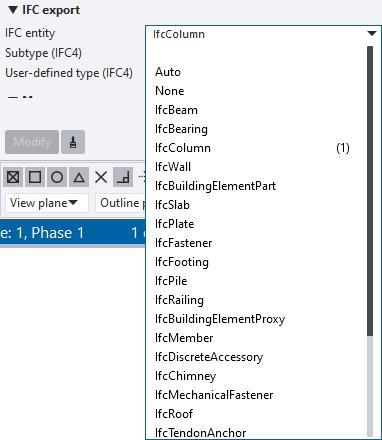
    You can start typing the name of the IFC entity and the matching entities are shown in the list.

    NOTE: The export types Surface Geometry (IFC2x3 export) and Precast view (IFC4 export) do not support using the IFC entity option None for part cuts.

  3. You can define the IFC entity more precisely by selecting an entity subtype among the predefined subtypes available in the Subtype (IFC4) list, or select USERDEFINED and then type the desired type in free text in User-defined type (IFC4).

    The subtype and user-defined type are only supported in the IFC4 export.

    The available subtypes depend on the selected IFC entity.

    For example, if you have a native assembly in your Tekla Structures model, you can define that its entity type is IfcBridgePart, and select a subtype among the predefined subtypes available, for example, PIER, or select USERDEFINED and then type the desired type in free text, for example, bridge part.

  4. Click Modify in the property pane.
Esta informação foi útil?
Enviar
Anterior
Seguinte