
Manage dropdown field options
You can add, update, and delete a dropdown field option when you are creating a new inspection test field or modifying the properties of an existing one in Maintenance.
Access Inspection Test Field Setup
You can manage dropdown field options in the Inspection Test Field Setup dialog.
-
Go to
.
The Inspection Tests dialog opens.

-
Do either of the
following:
- If you are creating a new test, click New Inspection Test.
- If you are modifying an existing test, click Inspection Test Properties.
The Inspection Test Setup dialog opens.
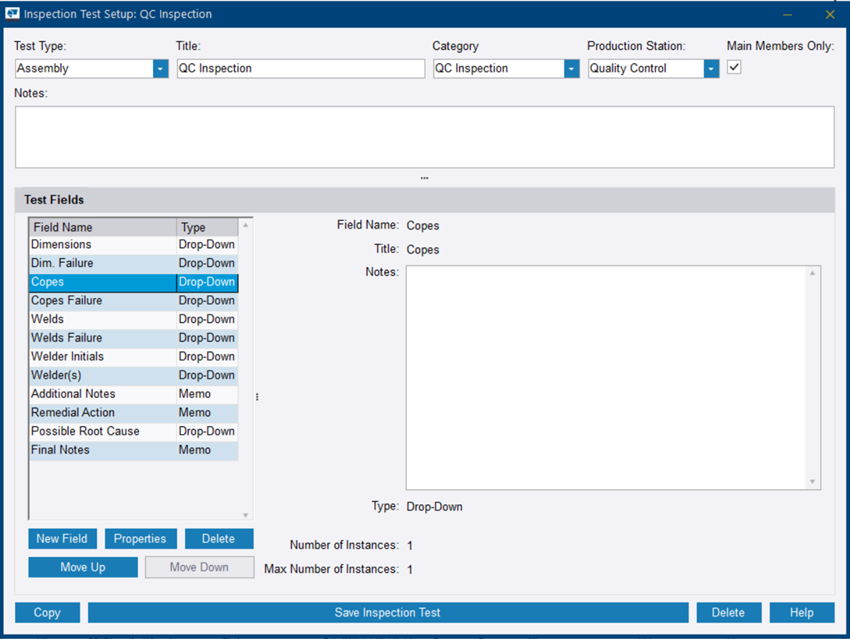
- Click either New Field or Properties, depending on your current task.
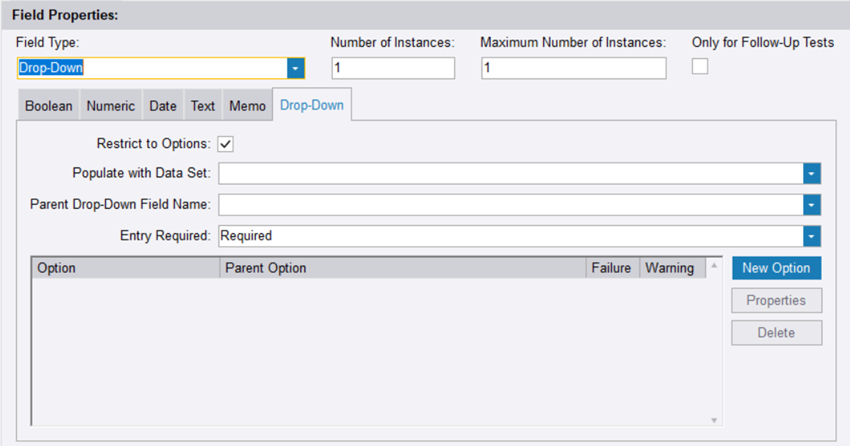
Add or modify a dropdown field option
-
On the
Drop-Down tab, do either of the following:
- To add a new option, click New Option.
- To view or modify an existing option, click Properties.
The Inspection Test Field Setup dialog opens.
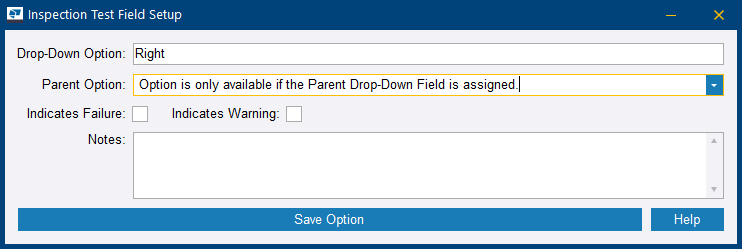
Drop-Down Option: The name of the option as it will appear in the dropdown field
Parent Option: Only available if Parent Drop-Down Field is selected in the Inspection Test Field Setup dialog
Indicates Failure: When selected, indicates that the test results in a failure.Indicates Warning: When selected, indicates that the test results in a warning.Notes: Any additional comments or notes related to the option
Delete a dropdown option
- On the Drop-Down tab, select a dropdown option.
- Click Delete.
- To confirm the deletion, click Yes.