
Railing plane to beam (94)
Railing plane to beam (94) creates a railing to connect two railings. The main part is the railing connected to the beam and the secondary part is the railing connected to the plane.
Objects created
-
Railing profile
-
Welds
Use for
| Situation | Description |
|---|---|
|
|
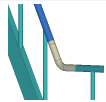
Railing profile created to connect two railings. |
Selection order
-
Select the main part.
-
Select the secondary part.
The connection is created automatically when you select the secondary part.
Part identification key
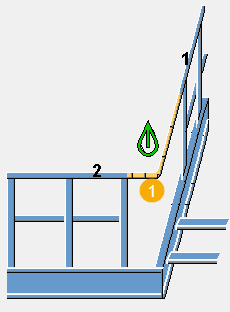
| Description | |
|---|---|
|
1 |
Railing profile |
Picture tab
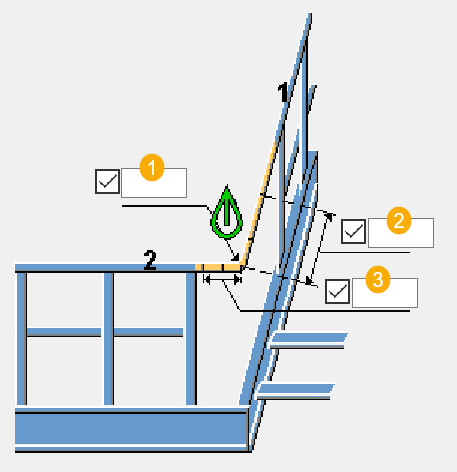
Use the Picture tab to control the geometry of the connection.
Dimensions
| Description | Default | |
|---|---|---|
|
1 |
Radius of the curve to be created to the railing. |
0 |
|
2 |
The length of the straight part between the bend and the first beam, measured from the geometrical intersection of the beams. |
0 |
|
3 |
The length of the straight part between the bend and the second beam, measured from the geometrical intersection of the beams. |
0 |
Parts tab
Use the Parts tab to define the part properties.
Profile
| Option | Description | Default |
|---|---|---|
|
Profile |
Select the bent railing profile from the profile catalog. |
Main part profile |
|
Option |
Description |
Default |
|---|---|---|
|
Pos_No |
Prefix and start number for the part position number. Some components have a second row of fields where you can enter the assembly position number. |
The default part start number is defined in the Components settings in . |
|
Material |
Material grade. |
The default material is defined in the Part material box in the Components settings in . |
|
Name |
Name that is shown in drawings and reports. |
Parameters tab
Use the Parameters tab to define the method of construction for the connection.
Method of construction
| Option | Description |
|---|---|
|
Create |
A new railing part is created to connect the main and secondary parts. This is the default option. |
|
Extend |
The railing is created as three tubes welded together. |
Fabricator name
Enter the fabricator name of the bend and the calculated additional beams.
General tab
Click the link below to find out more:
Analysis tab
Click the link below to find out more:
Welds
Click the link below to find out more: