
JP Floor beam gusset (11)
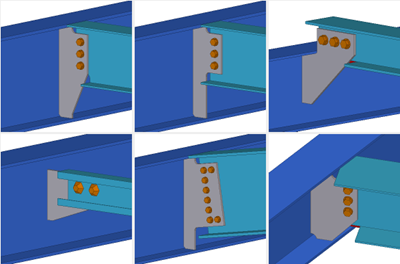
JP Floor beam gusset (11) creates a single shear bolted gusset to connect two beams. Optionally, a full depth stiffener can be added on the back side of the gusset. The gusset plate can be either a full depth gusset, or one of specified height on the main part web.
Objects created
-
Gusset plate
-
Stiffener
-
Bolts
-
Welds
Use for
| Situation | Description |
|---|---|
|
|
Bolted gusset connecting two beams Main part: Both H/I sections and C/U sections are supported. Secondary part: can have an angle profile, such as an H/I, C/U, or CC profile. The secondary part can be skewed, slanted, or canted. Floor beams can have a large offset from the main part. |
Selection order
-
Select the main part (beam).
-
Select the secondary part (floor beam, brace, purlin, for example).
The connection is created automatically when the secondary part is selected.
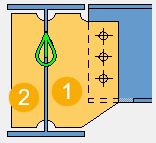
Part identification key
| Description | |
|---|---|
|
1 |
Gusset plate |
|
2 |
Stiffener |
Picture tab
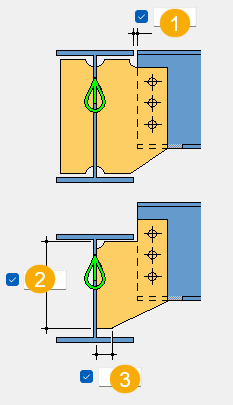
Use the Picture tab to define the connection dimensions, beam end cut, beam flange cut, and gusset shape.
Dimensions
| Description | Default | |
|---|---|---|
|
1 |
Gap between the main part flange and the secondary part |
10 mm |
|
2 |
Length of gusset on the main part web for the trapezoid gusset shape. The dimension is not used for other gusset shapes. |
Automatically calculated so that the bottom of the gusset is straight. |
|
3 |
Length of the straight edge of the gusset for the trapezoid gusset shape. The dimension is not used for other gusset shapes. |
20 mm |
Beam end cut
| Option | Description |
|---|---|
|
|
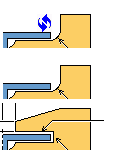
Default Bevel The secondary part is fitted to the main part in the vertical plane of the main part. AutoDefaults can change this option. |
|
|
Bevel |
|
|
Square The secondary part is cut square in the vertical plane of the secondary part. |


Beam flange cut
| Option | Description |
|---|---|
|
|
Default Bevel The secondary part is fitted to the main part in the horizontal plane of the main part. AutoDefaults can change this option. |
|
|
Bevel |
|
|
Square The secondary part is cut square in the horizontal plane of the secondary part. |
|
|
Partial The flange is fitted on the acute angle side of the secondary part, and is square on the other side. Define the straight dimension from the part center line to the chamfer.
|


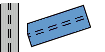
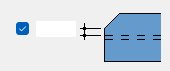
Gusset shape
| Option | Description |
|---|---|
|
|
Default Full depth trapezoid AutoDefaults can change this option. |
|
|
Full depth trapezoid |
|
|
Full depth rectangular tab |
|
|
Trapezoid You can define the base length of the trapezoid base on the main part web. |
|
|
Rectangular gusset, partial depth. Lacing profile and plate are created. |


Lower flange cut
| Option | Description |
|---|---|
|
|
Default Full cut Both the web and the flange are notched. AutoDefaults can change this option. |
|
|
Full cut |
|
|
Flange cut The flange is cut on the gusset side. |
|
|
No cut The flange and web are not cut, even if the gusset clashes with the flange. |
|
|
Automatic If the gusset clashes with the flange, a full cut is made, otherwise no cut is made. |


Notch cut dimensions
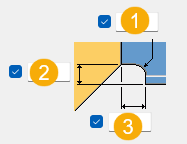
| Description | Default | |
|---|---|---|
|
1 |
Notch corner radius Only used when you select the full cut option for the lower flange cut. |
20 mm |
|
2 |
Notch height Only used when you select the full cut option for the lower flange cut. |
Automatically calculated to cut to the bottom corner of the gusset. Secondary part slope is not taken into account. |
|
3 |
Flange cut gap |
10 mm |
Parts tab
Use the Parts tab to define the part properties, dimensions, gusset plate position, and stiffener creation.
Parts
| Option | Description |
|---|---|
|
Gusset |
Thickness of the gusset plate |
|
Stiffener |
Thickness of the stiffener |
|
Size up for market plate thickness |
Size up the steps when calculating market size thickness for the gusset plate. |
|
Option |
Description |
Default |
|---|---|---|
|
Pos_No |
Prefix and start number for the part position number. Some components have a second row of fields where you can enter the assembly position number. |
The default part start number is defined in the Components settings in . |
|
Material |
Material grade. |
The default material is defined in the Part material box in the Components settings in . |
|
Name |
Name that is shown in drawings and reports. |
|
|
Finish |
Describes how the part surface has been treated. |
Dimensions
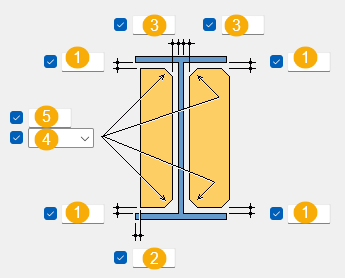
|
Description |
|
|---|---|
|
1 |
Gusset plate and stiffener edge distance to the main part flange |
|
2 |
Clearance of gusset plate and stiffener from the main part flange edge |
|
3 |
Gusset plate and stiffener edge distance to the main part web |
|
4 |
Chamfer shape |
|
5 |
Gusset plate and stiffener chamfer dimension |
Gusset plate position
| Option | Description |
|---|---|
|
|
Default Gusset plate is placed on the +X and +Y side of the secondary part relative to the global coordinate system. When the secondary part is skewed relative to the main part, the gusset plate is placed on the acute angle side of the secondary part. If the secondary part is an angle, channel (C/U) or CC profile, the gusset plate is placed on the back side of the secondary part. AutoDefaults can change this option. |
|
|
Right Gusset plate is placed on the right side viewed from the secondary part to the main part. |
|
|
Left Gusset plate is placed on the left side viewed from the secondary part to the main part. |
|
|
Automatic Gusset plate is placed on the +X and +Y side of the secondary part relative to the global coordinate system. |


Stiffener creation
| Option | Description |
|---|---|
|
|
Default Stiffener is not created. AutoDefaults can change this option. |
|
|
Stiffener is created perpendicular to the main part. |
|
|
Stiffener is created parallel to the secondary part and the gusset plate. |
|
|
Stiffener is not created. |




Gusset plate dimensions
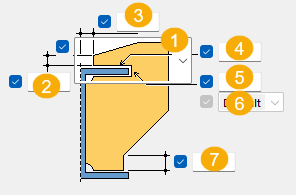
| Description | |
|---|---|
|
1 |
Gusset corner shape
|
|
2 |
Vertical edge distance from the gusset plate corner to the main part |
|
3 |
Horizontal edge distance from the gusset plate corner to the main part |
|
4 |
Vertical tolerance from the main part flange to the gusset edge |
|
5 |
Raised gusset corner chamfer dimension When the last option in the gusset corner shape list is selected, this is the horizontal tolerance between the main part flange and the gusset plate edge. Chamfer shape options are not available. |
|
6 |
Chamfer shape |
|
7 |
Gusset plate lower straight edge length. This is only used with the full depth trapezoid gusset plate shape. |
Lacing tab
Use the Lacing tab to define the dimensions and orientation for the lacing plate and profile.
Parts
| Option | Description |
|---|---|
|
Plate |
Thickness of the lacing plate |
|
Part |
Select the profile from the profile catalog. |
|
Option |
Description |
Default |
|---|---|---|
|
Pos_No |
Prefix and start number for the part position number. Some components have a second row of fields where you can enter the assembly position number. |
The default part start number is defined in the Components settings in . |
|
Material |
Material grade. |
The default material is defined in the Part material box in the Components settings in . |
|
Name |
Name that is shown in drawings and reports. |
|
|
Finish |
Describes how the part surface has been treated. |
Dimensions
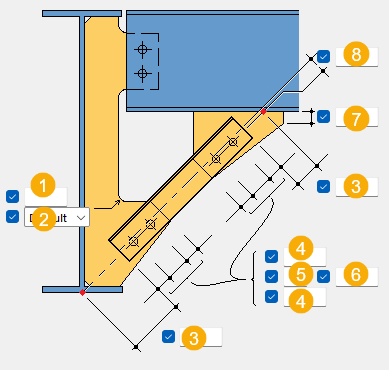
| Description | |
|---|---|
|
1 |
Define the chamfer size. |
|
2 |
Define the chamfer shape. |
|
3 |
Lower option: Offset from the lacing reference line to the actual start point of the lacing. The reference point is calculated as the intersection between the lacing center line and the main part web center line. Upper option: Intersection between the lacing reference line and the secondary part. |
|
4 |
Bolt edge distance from the start of the lacing to the first bolt, and bolt edge distance from the gusset plate edge to the last bolt. |
|
5 |
Number of bolts. |
|
6 |
Bolt spacing. |
|
7 |
Vertical dimension from the lacing plate corner to the secondary part. |
|
8 |
Offset of the bolt group from the lacing profile center line. |
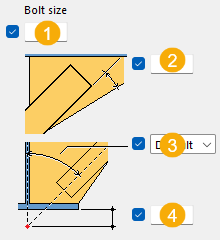
| Description | |
|---|---|
|
1 |
Define the bolt size. |
|
2 |
Lacing profile angle to the plate edge. |
|
3 |
Lacing profile angle to the plate edge. |
|
4 |
Offset of the reference point from the main part. |
Lacing layout
| Option | Description |
|---|---|
|
|
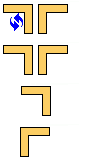
Select whether two lacing profiles, one lacing on the left, or one lacing on the right is created. |
Bolts tab
Use the Bolts tab to define the bolt group dimensions and bolt properties.
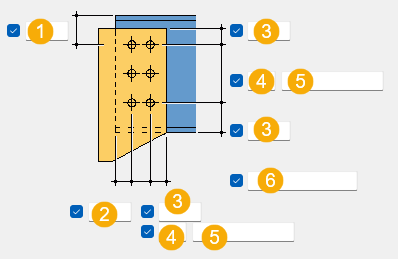
Bolt group dimensions
| Description | |
|---|---|
|
1 |
Dimension for vertical bolt group position. |
|
2 |
Dimension for horizontal bolt group position. |
|
3 |
Bolt edge distance. Edge distance is the distance from the center of a bolt to the edge of the part. |
|
4 |
Number of bolts. |
|
5 |
Bolt spacing. Use a space to separate bolt spacing values. Enter a value for each space between bolts. For example, if there are 3 bolts, enter 2 values. |
|
6 |
Define which bolts are deleted from the bolt group. Enter the bolt numbers of the bolts to be deleted and separate the numbers with a space. Bolt numbers run from left to right and from top to bottom. |
Bolt basic properties
|
Option |
Description |
Default |
|---|---|---|
|
Bolt size |
Bolt diameter. |
Available sizes are defined in the bolt assembly catalog. |
|
Bolt standard |
Bolt standard to be used inside the component. |
Available standards are defined in the bolt assembly catalog. |
|
Tolerance |
Gap between the bolt and the hole. |
|
|
Thread in mat |
Defines whether the thread may be within the bolted parts when bolts are used with a shaft. This has no effect when full-threaded bolts are used. |
Yes |
|
Site/Workshop |
Location where the bolts should be attached. |
Site |
Slotted holes
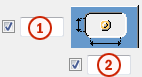
You can define slotted, oversized, or tapped holes.
|
Option |
Description |
Default |
|---|---|---|
|
1 |
Vertical dimension of slotted hole. |
0, which results in a round hole. |
|
2 |
Horizontal dimension of slotted hole, or allowance for oversized holes. |
0, which results in a round hole. |
|
Hole type |
Slotted creates slotted holes. Oversized creates oversized holes. No hole does not create holes. Tapped creates tapped holes. |
|
|
Rotate Slots |
When the hole type is Slotted, this option rotates the slotted holes. |
|
|
Slots in |
Part(s) in which slotted holes are created. The options depend on the component in question. |
Bolt assembly
The selected check boxes define which component objects (bolt, washers, and nuts) are used in the bolt assembly.
If you want to create a hole only, clear all the check boxes.
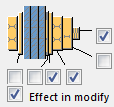
To modify the bolt assembly in an existing component, select the Effect in modify check box and click Modify.
Bolt length increase
Define how much the bolt length is increased. Use this option when, for example, painting requires the bolt length to be increased.

Gusset bolt alignment
| Option | Description |
|---|---|
|
|
Select how the bolts are aligned. |

General tab
Click the link below to find out more:
Design tab
Click the link below to find out more:
Analysis tab
Click the link below to find out more:
Welds
Click the link below to find out more: