
Cutting braces (87, 89)
To define the cuts in the legs of the braces, go to:
-
Horizontal legs: Parts tab
-
Vertical legs: Extra cuts tab (87), Cuts d.1 and Cuts d.2 tab (89)
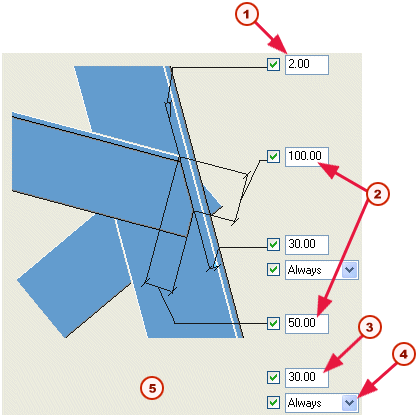
These tab pages contain options to cut the legs of the braces, and the dimensions of the cut. This is how they appear on the Parts tab:
| Description | |
|---|---|
| 1 |
Incremental value for the angle of the cut. If you enter 2, the actual angle can be 2, 4, 8, etc |
| 2 |
Cut dimensions |
| 3 |
Clearance to heel of tower leg |
| 4 |
Cut options |
| 5 |
Clearance between main profile leg and diagonal 2 |
Note:
Use the Always cut option to cut the braces and create the clearance to the heel of the tower leg. This option overrides the bolt edge distances on the Picture tab.