The Smart Create
tool speeds up the creation of work packages especially with simple jobs when there
are only few criteria for making the packages. You can select up to three properties
that can be combined to make a list of work packages.
-
Open a
Production Control job.
-
On the Production Control ribbon tab, select Work
Packages
The Work
Packages dialog opens.
-
Click Smart
Create.
The
Work
Package Smart Create dialog opens.
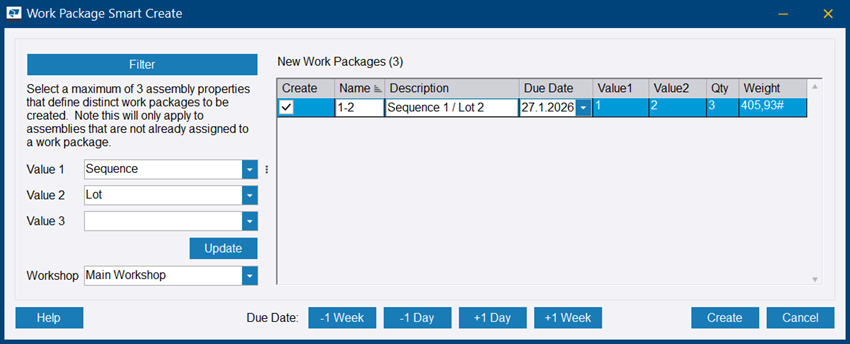
-
Select up to
three values, the workshop, and click Update.
Your work
packages are named according to the values you
selected. You can modify Name
and Description.
The work packages are selected by default in the
Create column. You can unselect the packages that you do
not want to create.
If you have set a default workshop in
, Workshop is populated automatically.
Due
Date: Defaults to the current date. Use the drop-down calendar or the Due
Date buttons in the lower part of the dialog to change the date.
-
Click Create.
The Work
Packages dialog opens showing the new work packages.
You can open the work packges for viewing and
modifying.
