
View the production dashboard
You can view and manage the Tekla PowerFab Go production productivity dashboard, the shipping calendar, cut lists, and work packages for a job directly from Tekla PowerFab Office.
For a user to be able to view the dashboard, the user with administrator rights must add the user's PowerFab Go Site Address in . See Define Tekla PowerFab administration settings.
Note: You
must have a Tekla
PowerFab subscription to access the
embedded dashboards in Tekla PowerFab Office.
In Production Control, do either of the following:
- In the Select Production Control Job dialog, click Dashboards and select the desired functionality to open the corresponding dashboard
view.
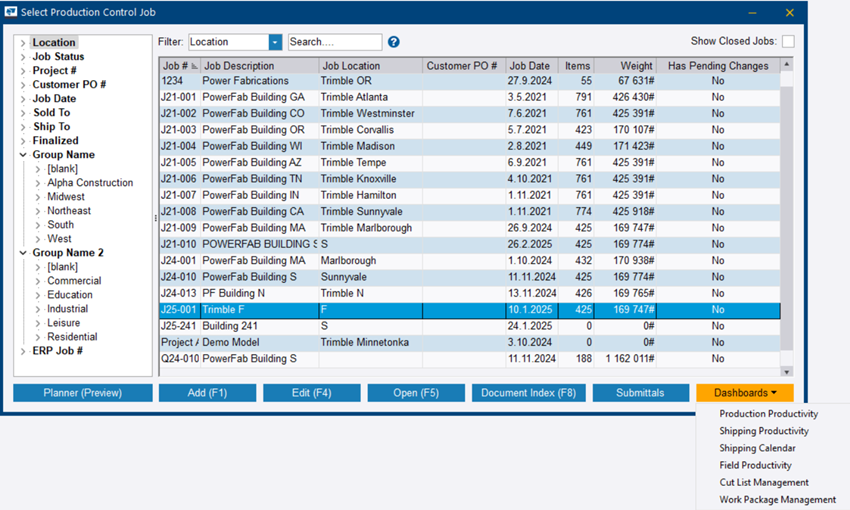
- In the Select Production Control Job dialog, open a job, click the Production Control ribbon tab, and select Dashboards and select the desired functionality to open the corresponding dashboard
view.
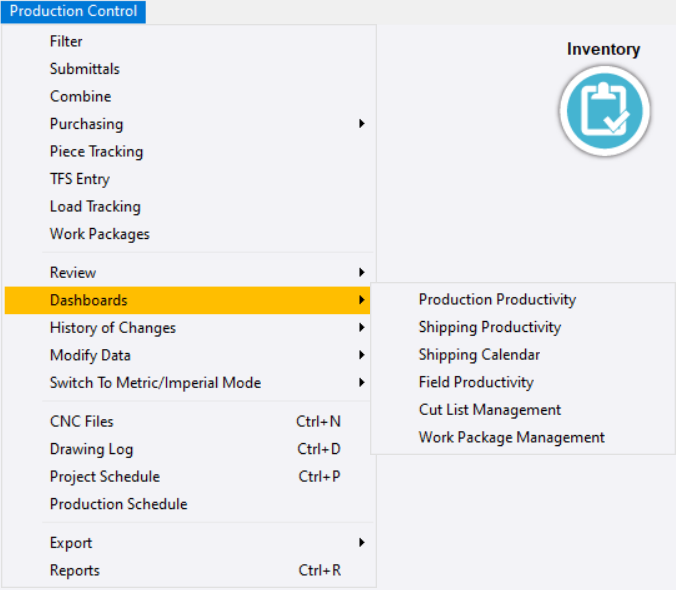
The Dashboards view opens.
You can launch the cut list dashboard also from the Cut Lists dialog. See Access Cut Lists dialog.
For information on the Tekla PowerFab Go dashboards, see Dashboards in Tekla PowerFab Go.
To access other functionalities of Tekla PowerFab Go, you have to open Tekla PowerFab Go in a browser.