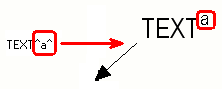
You can use superscript in texts included
in all your text objects, part marks, dimension marks, and associative notes.
-
On the File menu, click and go to the Dimensioning - general category.
-
Ensure that the advanced option
XS_SUPERSCRIPT_USED_IN_DRAWING_TEXTS is set to
TRUE.
-
Open the properties of a text object, mark or associative note by holding down
Shift and clicking a text, mark or note command on the
ribbon, or by selecting the command in the property pane object list.
For example, on the Annotations tab, click .
-
Do one of the following:
- For text objects, type the desired
text in the Text box.
- For marks and associative notes, add
a Text element in the editor and type the desired text in the element box.
-
Enter circumflexes (^) around the characters that you
want to have in superscript.
-
Add the text, mark or note in the drawing.
The
following example shows how the superscript is typed in the text and what it looks
like in the existing drawing.