Adding comments to row rules and value field formulas in Template Editor

Tekla Structures
Modifierad: 19 jan 2026
2026
Tekla Structures

Adding comments to row rules and value field formulas in Template Editor

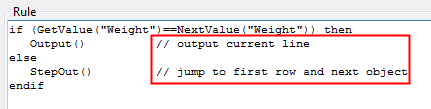
You can add comments to row rules and value field formulas in order to add information that may be useful or helpful to you.

To add comments to rules and formulas:

  1. Select the value field or row and double-click to open the Value Field Properties or the Row Properties dialog box.
  2. Click the Formula button to open the Formula Contents dialog box or the Advanced button to open the Rule Contents dialog box.
  3. Modify the contents of the formula or rule and add the comments at the end of each line with the following syntax: // <comment>

    You can also insert comments in-line with the following syntax: /* <comment> */

Var det här användbart?
Skicka
Föregående
Nästa