XS_REPORT_BOLTS_WITH_SUPPORTING_MEMBER
Category in Advanced options dialog: Templates and symbols
Use this advanced option to control whether site bolts are shown in the Bill of Materials (BOM) of the supporting member in reports and KSS files.
FALSE: Site bolts are not shown in the BOM of the supporting member. This is the default value.TRUE: Site bolts will be included in the BOM of the supporting member.
This advanced option is user specific and the setting is saved in options.bin under the user folder, for example, in C:\Users\<user>\AppData\Local\Trimble\Tekla Structures\<version>\UserSettings. Restart Tekla Structures to activate the new value.
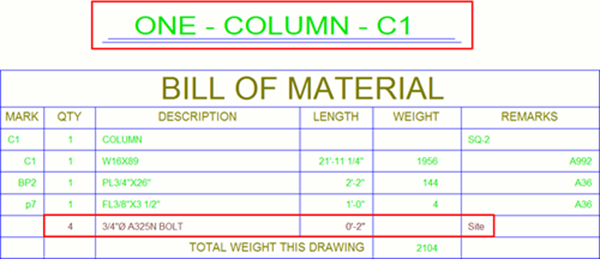
In the following BOM example, the
advanced option is set to TRUE:
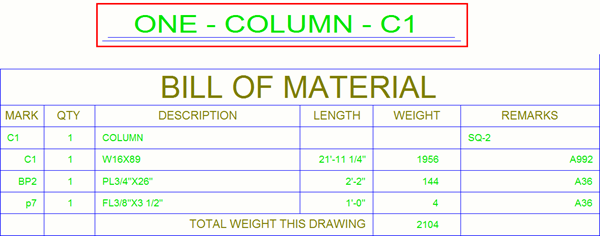
In the following BOM example, the
advanced option is set to FALSE:
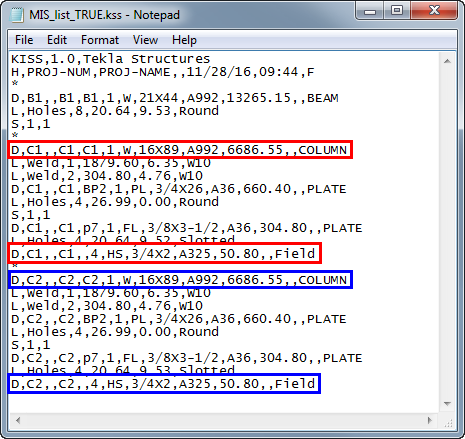
In the following KSS file example, the
advanced option is set to TRUE:
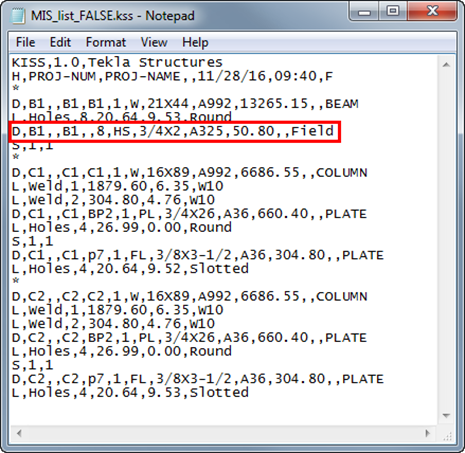
In the following KSS file example, the
advanced option is set to FALSE: