
XS_UPSIDE_DOWN_TEXT_ALLOWED
Category: Concrete detailing
Set this advanced option to
TRUE to have the text reading direction indicate the part installation direction. If there are similar asymmetric parts with different orientation, some part marks may be placed upside down. When you set the advanced option to
FALSE (default), none of the part marks are created upside down, so the text reading direction does not indicate the installation direction. If you set it to
CONCRETE, only concrete marks and texts are upside downSTEEL, only steel marks and texts are upside downTIMBER, only timber marks and texts are upside down
You can also use combinations of values separated by a comma, for example,
CONCRETE,STEEL.
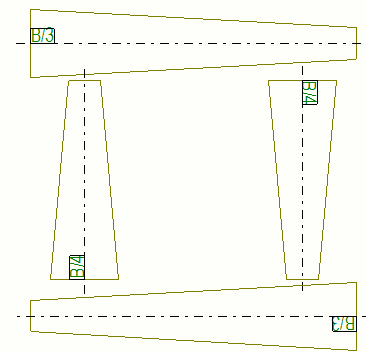
Example of the mark orientation when the advanced option is set to
TRUE.
This advanced option is role specific. When the type SYSTEM(ROLE) is in use, the default value is used. When the type MODEL(ROLE) or DRAWING(ROLE) is in use, you can change the value, which is then the same for all users in the current model.
For more information about indicating part orientation with marks, for example, see Indicate part orientation.