
Muffe (26)
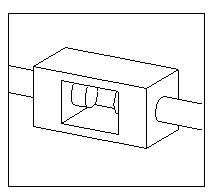
Muffe (26) connects two beams with a rectangular plate that has a hole in the middle.
Objects created
-
Rectangular plate (muffe)
Use for
| Situation | Description |
|---|---|
|
|
Two beams connected with a rectangular plate that has a hole in the middle. |
Selection order
-
Select the main part.
-
Select the secondary part.
The connection is created automatically when the secondary part is selected.
Part identification key
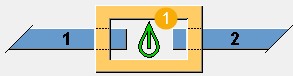
| Description | |
|---|---|
|
1 |
Rectangular plate with a hole |
Picture tab
Use the Picture tab to define the connection dimensions.
Dimensions
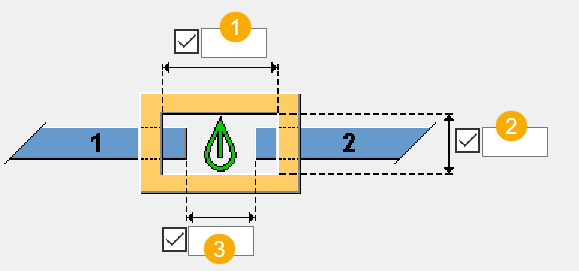
| Description | Default | |
|---|---|---|
|
1 |
Horizontal dimension of the hole. |
0.5 * muffe height |
|
2 |
Vertical dimension of the hole. |
Muffe thickness - 30 mm |
|
3 |
Distance between the main part and the secondary part. |
0.5 * muffe height - 50 mm |
Parts tab
Use the Parts tab to define the plate properties.
Muffe
You can use a profile or a custom component to create the plate. If you select a custom component from the Applications & components catalog, define the custom settings, up direction, and rotation.
| Option | Description | Default |
|---|---|---|
|
Muffe |
Thickness, width, and height of the plate. |
Thickness and width: 100 mm Height: 200 mm |
|
Option |
Description |
Default |
|---|---|---|
|
Pos_No |
Prefix and start number for the part position number. Some components have a second row of fields where you can enter the assembly position number. |
The default part start number is defined in the Components settings in . |
|
Material |
Material grade. |
The default material is defined in the Part material box in the Components settings in . |
|
Name |
Name that is shown in drawings and reports. |
Parameters tab
Use the Parameters tab to define the bolt hole tolerance.
Tolerance
| Option | Description |
|---|---|
|
Tolerance of bolt hole |
Define the tolerance value. By default, the tolerance is zero. |
General tab
Click the link below to find out more:
Analysis tab
Click the link below to find out more:
Design tab
Click the link below to find out more: