
Add accessories to an estimate item
Accessories are are a way to add secondary parts or connection material to an estimate.
You can create accessories for items such as stiffeners, base plates, or embeds. Accessories can also be linked to specific material shapes and sizes, so that they can only be added to items of that shape and size.
Accessories must be applied manually.
We recommend that you create, modify, and delete accessories in Accessory Maintenance. You can also create accessories in an estimating job, but these job-specific accessories cannot be saved to the accessory library, so they cannot be reused in other estimating jobs. See Manage accessories.
Note: You can also add an accessory by typing the part number of the accessory in the
Part
# field.
-
On the menu, select
Add
Accessory.
The Select Accessory dialog opens.
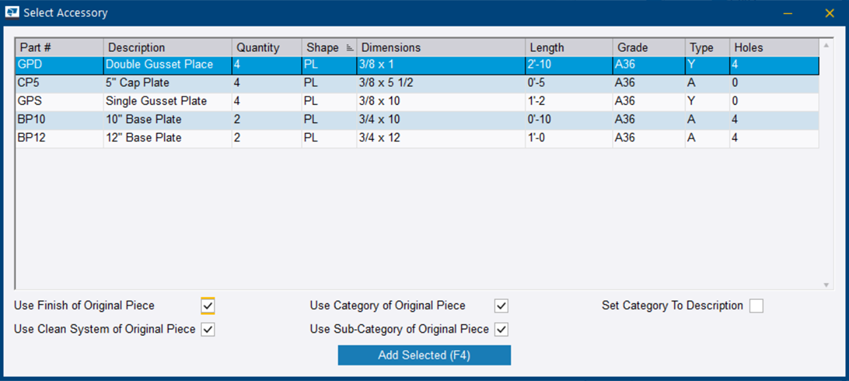
The dialog lists all of the predefined accessories that can be applied to the selected part on the estimate.
If the accessory list is empty, there are no accessories linked to the selected material shape and size. In these cases, you can either create a new accessory or create a job-specific accessory. See Create an accessory and Create a job-specific accessory.
The Select Accessory dialog closes.
The accessory is added as the last item of the selected page in the Estimating dialog.
Accessories have the same input fields and properties as other estimating items. In addition, accessories have a description.