
TOP_LEVEL
This is a template attribute. Template attributes can be used in filtering, or to retrieve data from the model to use in drawings and reports. For example, when you create a report, Tekla Structures replaces the attributes added in the report template with the corresponding object property values.
This attribute shows the top level of a single part, cast unit, assembly, part of a connection, or a pour object.
With content types REBAR and SINGLE_REBAR, and in rebar marks, this attribute shows the top level of a single reinforcing bar, bar group, or rebar set bar group. For bar groups, the SINGLE_REBAR row shows the value of the whole group, not the values of individual bars.
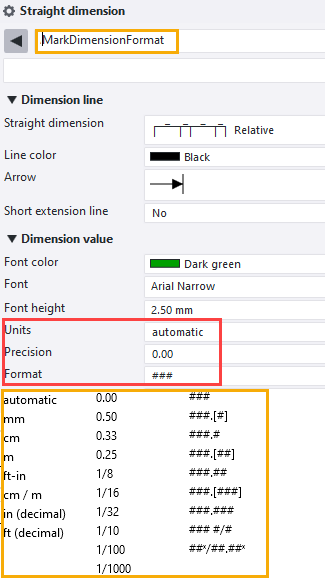
Top level takes the unit and accuracy from the MarkDimensionFormat.dim dimension property file. You can modify the settings saved in MarkDimensionFormat.dim in the dimension property pane in an open drawing.
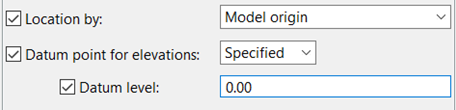
The datum level only affects the TOP_LEVEL attribute when Location by is set to Model origin or to the project base point that is in the model origin.
Note:
Users working in the same model should ensure that they all use the same version of the MarkDimensionFormat.dim file.
You can use this attribute as a user-defined attribute also in part marks and associative notes.
Adding _BASEPOINT at
the end of the attribute gives coordinates relative to the base point selected in
the view, and adding _PROJECT at the end gives coordinates relative to the base
point selected as the project base point. _BASEPOINT
uses the current base point in the same way as the workplane uses the current
workplane: If there is no current base point defined, _BASEPOINT
provides values relative to model origin (Global).
Note:
This attribute returns the value as text, so you cannot use formula with this attribute. Use TOP_LEVEL_UNFORMATTED instead.