
Rebar hole
Rebar hole creates holes for reinforcing bars in a steel column, beam, or contour plate.
Objects created
-
Holes
-
Cuts
Use for
|
Situation |
Description |
|---|---|
|
|
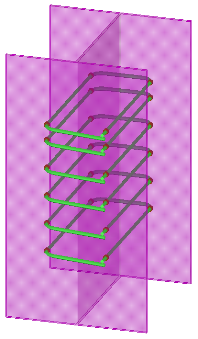
Holes created for reinforcing bars in a steel beam. |
Selection order
-
Select the main part (column, beam, or contour plate).
-
Select the secondary part (reinforcing bar group).
-
Click the middle mouse button to create the holes for the reinforcing bars.
Part identification key
|
Part |
|
|---|---|
|
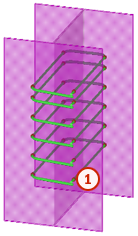
1 |
Hole for reinforcing bar |
Parameters tab
Use the Parameters tab to control the properties of the reinforcing bar holes.
Reinforcing bar hole properties
|
Option |
Description |
Default |
|---|---|---|
|
Bolt standard |
Select the bolt standard:
|
6914 |
|
Rounding type |
Select the rounding type:
|
No default value Example dimensions:
|
|
Hole tolerance |
Define the hole tolerance. When you select Round by table as the rounding type, you cannot define the hole tolerance. |
0 mm |
|
Rounding precision |
Define the rounding precision. When you select Round by table as the rounding type, you cannot define the rounding precision. |
1 mm |
|
Dimension table |
Define the reinforcing bar diameter, hole diameter, and slotted hole extension. To define the dimensions in the table, select the Round by table option as the rounding type. Rebar hole uses an existing bolt size and adjusts the hole tolerance value until the desired Hole diameter is reached. Use the + and the - buttons to add and delete rows from the table. |
Advanced tab
Use the Advanced tab to control the hole type, vertical offset, and angle range dimension.
Hole type
|
Option |
Description |
Default |
|---|---|---|
|
Hole type |
Select the hole type:
|
Bolt hole |
Vertical offset
|
Option |
Description |
|---|---|
|
|
Default The hole is not offset. |
|
|
The hole is offset upward to directly support the reinforcing bar to keep the bar in the correct vertical position. The hole can be offset if the hole is a circular hole. |


Angle range dimension
|
Description |
Default |
|
|---|---|---|
|
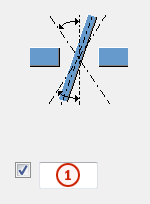
1 |
Angle range dimension. A round hole is created within the defined range. Holes that go beyond the range are transformed into slotted holes. |
5 mm |