
Defining filler plates (177)
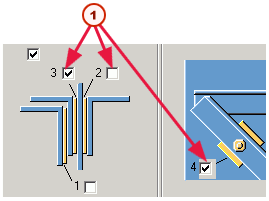
If necessary, Leg - 2 & 3 diagonals (177) automatically creates filler plates in the gaps between the braces and the tower leg.

| Description | |
|---|---|
|
Plate 1: Between the first diagonal brace picked and the horizontal brace |
|
|
Plate 2: Between the second diagonal brace picked and the tower leg |
|
|
Plate 3: Between the horizontal brace and the tower leg |
|
|
Plate 4: Between the first horizontal brace picked and the tower leg |
|
| 1 |
Horizontal brace |
| 2 |
First diagonal brace picked |
| 3 |
Second diagonal brace picked |
| 4 |
Tower leg |
| 5 |
Effect in modify |
To specify the properties of each filler plate, use the fields on the Plates tab.
To remove a filler plate, go to the illustration and clear the checkbox against it:
| Description | |
|---|---|
| 1 |
To remove a plate, clear its checkbox. Here we are removing plates 1 and 2 |