
Modifying gusset plate shape
To change shape of a gusset plate, you need to change its dimensions. Bracing components automatically create gusset plates based on the dimensions in the joints.def file.
-
To only modify the dimensions of the gusset plate for the connections you have selected, enter the new dimensions on the Picture tab.
-
To modify the dimensions of the gusset plate for all connections that this component creates, edit the dimensions in the joints.def file. Tekla Structures uses values in the joints.def file to create this component. See Define connection properties in the joints.def file.
Using the dialog box
To modify the shape of the gusset plate using the dialog box:
-
Go to the Picture tab and enter values in any of the following fields (this image is from Corner bolted gusset (57)):
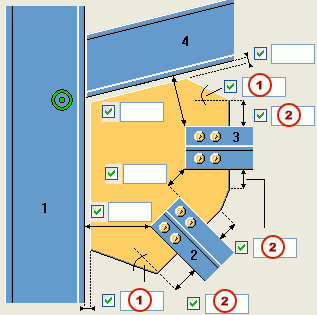
1
Enter angles here.
2
Enter dimensions here.
-
Click the Apply button to change any connections you have open.