
Manage submittals to an Advance Bill job
A submittal is a package of information exchanged between a steel detailer and a fabricator through Tekla Connector. You can view a list of all submittals to a job. You can also synchronize submittals, view and modify the details of each submittal, and import the submittal.
Note: The Advance Bill workflow only works for basic steel beams and
plates. Therefore, you cannot add other materials or special objects like polybeams,
bent plates, lofted plates, or spiral beams.
-
Open a job.
If there are outstanding submittals, a notification appears in the upper left of the job dialog.

-
Click the module ribbon tab and select Submittals.
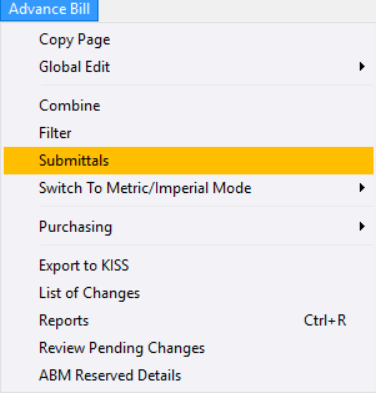
The Submittals dialog opens listing all the submittals to the job.
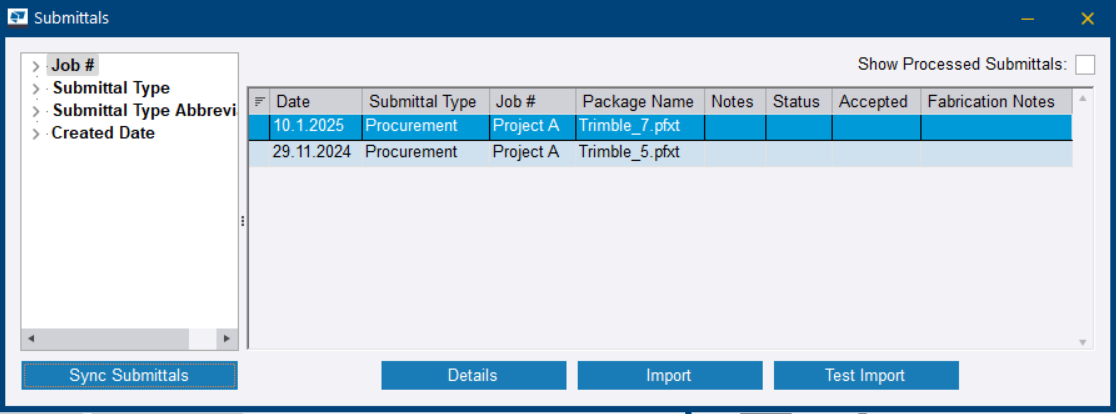
Show Processed Submittals: Select to show accepted and rejected submittals
Sync Submittals: Synchronize submittals. Only jobs with the status Open are synchronized. See Set job statuses for production control jobs.
Details: View and modify details in the Submittal Details dialog
Import: Import the submittal
Test Import: Test import the submittal