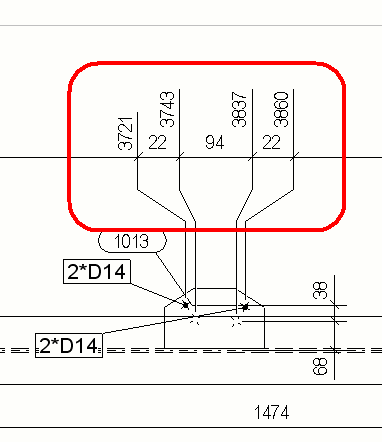
You can exaggerate narrow dimensions to make them easier to read.
When you enable the exaggeration of the dimensions, a dimension that is narrower than the defined limit is enlarged. If there are many exaggerated dimensions,
Tekla Structures arranges them automatically. Setting exaggeration consists of selecting the exaggeration limit and the exaggeration scale, enabling the exaggeration and setting the direction, origin, width, position and height for the exaggerated dimensions.
For single-part , assembly and cast unit drawings, save the dimension exaggeration properties on object level in an open drawing into a dimension properties file, which you can take into use when you modify dimensioning rules.
Limitation: Exaggeration works only if
the dimension extension lines are long. Set Short extension line to No in the dimension properties.
-
On the
File menu, click
and go to the
Drawing dimensions settings.
-
Enter the exaggeration limit in the
Exaggeration limit box.
-
Select
Paper or
Model as the exaggeration scaling method.
If you select
Paper, the exaggeration limit is multiplied by the view scale. For example, if the scale is 1:10 and the limit is 10 mm, then all the dimensions smaller than 100 mm are exaggerated.
If you select Model, all dimensions smaller than 10 mm can be exaggerated regardless of the
drawing scale.
-
Click OK.
-
Open a drawing and double-click a dimension.
-
In the Dimension line section, set Short extension line to No.
-
In the Exaggeration section, enable the exaggeration by setting Exaggerate short dimensions to Specified.
-
Set the values for
Direction,
Origin,
Width,
Position and
Height.
-
Type a name for the dimension
properties file at the top and click Save.
-
If you
want to modify the current dimension, click Modify. Otherwise, close the dialog.
Now you have a dimension
properties file that contains the exaggeration settings, which you can load
later on, or use in dimensioning rules.
Example
See below for an example of exaggerated dimensions: